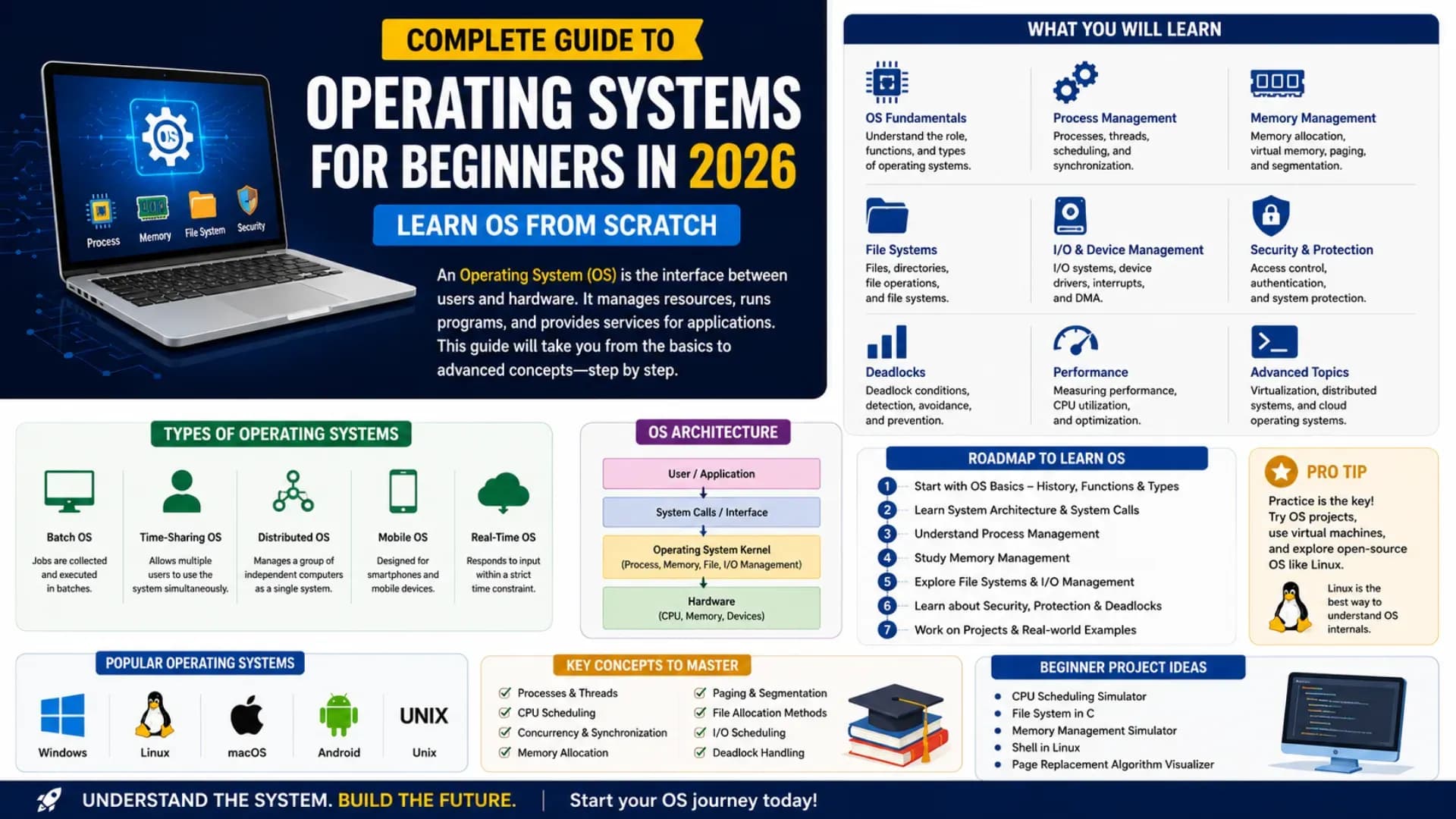
Every program you run, every file you save, every network request your browser makes — all of it passes through the operating system. The OS is the software that sits between your hardware and every application running on it, managing resources, enforcing isolation, scheduling work, and making the machine usable. Understanding how operating systems work is one of the most foundational investments in a computer science education — it explains why programs behave the way they do, what happens when they crash, and how modern multi-core machines stay responsive while running hundreds of processes simultaneously. This complete Operating Systems tutorial takes you from the role of an OS through process management, CPU scheduling, memory management, file systems, and concurrency — covering every core concept you need to learn operating systems from scratch. This operating systems guide 2026 includes working code, concrete examples, and the vocabulary of OS concepts that every software engineer should know. Let's begin.
Related Article:
Top BTech Colleges in India 2026
Table of Contents
- What Is an Operating System? Role and Structure
- Process Management — How the OS Runs Programs
- CPU Scheduling — Who Runs Next?
- Memory Management — Virtual Memory and Paging
- Concurrency — Threads, Locks, and Deadlock
- File Systems — How Storage Is Organised
- I/O Management and Device Drivers
- Next Steps — OS Learning Path for 2026
What Is an Operating System? Role and Structure
An operating system is system software that manages computer hardware and software resources and provides common services for computer programs. It is the intermediary between user applications and the hardware — no application talks to the CPU, RAM, or disk directly; it asks the OS to do it on its behalf.
# OS layer model — what sits where:
#
# ┌──────────────────────────────────────────┐
# │        User Applications                 │  Chrome, Python, VS Code
# ├──────────────────────────────────────────┤
# │        System Libraries                  │  libc, POSIX API, Win32
# ├──────────────────────────────────────────┤
# │        System Call Interface             │  write(), read(), fork()
# ├──────────────────────────────────────────┤
# │        OS Kernel                         │  scheduler, VM, VFS, drivers
# ├──────────────────────────────────────────┤
# │        Hardware                          │  CPU, RAM, Disk, NIC, GPU
# └──────────────────────────────────────────┘
#
# The kernel runs in privileged mode (Ring 0 on x86)
# Applications run in user mode (Ring 3)
# System calls switch from user mode to kernel mode (trap/interrupt)
Core OS Responsibilities
- Process Management: Creating, scheduling, and terminating processes; managing their state and resources
- Memory Management: Allocating RAM to processes, implementing virtual memory, handling page faults
- File System: Organising storage into files and directories; managing disk access and caching
- I/O Management: Abstracting hardware devices through drivers; managing device queues
- Security and Protection: Enforcing access control, process isolation, and privilege levels
- Networking: TCP/IP stack implementation, socket management
Kernel Types
# Monolithic kernel (Linux, Unix):
#   All OS services run in kernel space — fast, tightly coupled
#   A driver bug can crash the entire system
#   Example: Linux kernel (~30 million lines of C)
#
# Microkernel (Mach, QNX, seL4):
#   Minimal kernel — only scheduling, memory, IPC
#   Services (drivers, file systems) run in user space
#   More fault-tolerant; slower due to IPC overhead
#
# Hybrid kernel (Windows NT, macOS XNU):
#   Microkernel design with performance compromises
#   Some services moved to kernel space for speed
#
# Exokernel (research, MIT):
#   Minimal abstraction — applications manage hardware directly
#   Maximum performance; minimal safety guarantees
Why operating system concepts matter in 2026: Every cloud deployment, container, serverless function, and microservice runs on an OS. Engineers who understand process management, memory management, and CPU scheduling debug faster, design better systems, and write software that is measurably more performant. OS concepts are the substrate beneath all of systems programming.
Process Management — How the OS Runs Programs
A process is a program in execution — understanding process management is the first concrete step to — a running instance of a binary with its own memory space, open file descriptors, CPU register state, and execution context. Process management is how the OS creates, tracks, schedules, and terminates these instances.
# Process vs Program:
#   Program = passive file on disk (e.g., /usr/bin/python3)
#   Process = active execution of that program (PID 4821)
#
# Process states (state machine):
#
#   NEW ──────→ READY ←──────── WAITING
#                │  ↑               ↑
#            dispatch│  │preempt      │I/O complete
#                ↓  │           I/O wait│
#              RUNNING ───────────────┘
#                │
#                └──→ TERMINATED
#
# NEW:        process being created (resources allocated)
# READY:      process ready to run, waiting for CPU
# RUNNING:    process currently executing on CPU
# WAITING:    process blocked, waiting for I/O or event
# TERMINATED: process finished, resources being reclaimed
# Process Control Block (PCB) — the OS's data structure for a process:
#
# struct PCB {
# int pid; // Process ID
# int parent_pid; // Parent PID (created by fork())
# state process_state; // NEW/READY/RUNNING/WAITING/TERMINATED
# uint64 program_counter; // address of next instruction
# uint64 cpu_registers[]; // saved register state (for context switch)
# int priority; // scheduling priority
# void* page_table; // virtual memory mappings
# int open_fds[]; // open file descriptor table
# uint64 cpu_time; // CPU time consumed
# limits resource_lim; // max memory, max files, etc.
# };# fork() and exec() — the Unix process creation model:
import os
# fork() creates an exact copy of the current process
pid = os.fork()
if pid == 0:
# Child process (fork returns 0 to child)
print(f"Child: PID={os.getpid()}, Parent={os.getppid()}")
# exec() replaces the child's memory with a new program
os.execv("/bin/ls", ["ls", "-l"])
# exec() never returns if successful
else:
# Parent process (fork returns child PID to parent)
print(f"Parent: PID={os.getpid()}, created child PID={pid}")
os.waitpid(pid, 0) # wait for child to finish (prevent zombie)
print("Parent: child finished")
# This fork-exec pattern is how every shell runs commands:
# shell forks → child execs the program → parent waitsContext Switching
# Context switch — switching CPU from one process to another:
#
# 1. Timer interrupt fires (or process blocks on I/O)
# 2. OS saves current process's CPU state (registers, PC) → its PCB
# 3. OS selects next process from ready queue (scheduling decision)
# 4. OS loads that process's saved state from its PCB → CPU registers
# 5. CPU resumes execution of new process
#
# Context switch cost: typically 1–10 microseconds
# (register save/restore + TLB flush + cache cold start)
# Linux on modern hardware: ~2000 ns per context switch
#
# This is the mechanism that creates the illusion of parallel
# execution on a single CPU — fast enough context switching
# makes it seem like all processes run simultaneously
CPU Scheduling — Who Runs Next?
CPU scheduling is the OS mechanism that decides which process in the READY queue gets to run on the CPU next. The scheduling algorithm affects throughput, response time, and fairness across all running processes. Understanding CPU scheduling is essential to learn operating systems for both academic exams and real-world performance engineering.
# Key CPU scheduling metrics:
#
# CPU Utilisation:  percentage of time CPU is busy (maximise)
# Throughput:       processes completed per unit time (maximise)
# Turnaround Time:  total time from submission to completion (minimise)
# Waiting Time:     time spent in ready queue (minimise)
# Response Time:    time from submission to first response (minimise)
#
# Scheduling criteria conflict: optimising one often hurts another
# Example: FCFS maximises simplicity but has poor response time
# 1. FCFS — First Come First Served (simplest, non-preemptive):
#
# Process Arrival Burst Start Finish Turnaround Waiting
# P1 0 24 0 24 24 0
# P2 1 3 24 27 26 23 ← convoy effect
# P3 2 3 27 30 28 25
#
# Avg Waiting = (0 + 23 + 25) / 3 = 16 ms
# Problem: convoy effect — short jobs wait behind long jobs
#
# 2. SJF — Shortest Job First (optimal average wait, but needs burst time):
#
# Same processes, sorted by burst time:
# P2 (3ms) → P3 (3ms) → P1 (24ms)
# Avg Waiting = (0 + 3 + 6) / 3 = 3 ms ← much better!
# Problem: requires knowing burst time in advance (not always possible)# 3. Round Robin — preemptive, each process gets a time quantum (q):
#
# q = 4ms. Processes: P1(24ms), P2(3ms), P3(3ms)
#
# Time 0–4: P1 runs (4ms used, 20 remaining) → back of queue
# Time 4–7: P2 runs (3ms, finishes)
# Time 7–10: P3 runs (3ms, finishes)
# Time 10–14: P1 runs (4ms used, 16 remaining)
# ... continues until P1 finishes at time 30
#
# Good response time for short jobs; more context switches overhead
# q too small → too many switches; q too large → becomes FCFS
# Linux default quantum: ~4ms (CFS uses a different approach)
#
# 4. Priority Scheduling:
# Each process has a priority number; CPU given to highest priority
# Problem: starvation — low-priority processes never run
# Solution: aging — gradually increase priority of waiting processes
#
# 5. CFS — Completely Fair Scheduler (Linux, since 2.6.23):
# Goal: give each process exactly equal CPU time (virtual runtime)
# Uses a red-black tree ordered by virtual runtime
# Always runs the process with smallest virtual runtime (leftmost node)
# Nice values (-20 to +19) adjust the rate of virtual runtime growth# Python simulation of Round Robin scheduler:
from collections import deque
def round_robin(processes, quantum):
"""
processes: list of (name, burst_time)
quantum: time slice per turn
Returns: average waiting time
"""
queue = deque([(name, burst) for name, burst in processes])
time = 0
waiting = {name: 0 for name, _ in processes}
remaining = {name: burst for name, burst in processes}
while queue:
name, _ = queue.popleft()
burst = remaining[name]
run = min(burst, quantum)
# All other processes in queue accumulate waiting time
for other, _ in queue:
waiting[other] += run
time += run
remaining[name] -= run
if remaining[name] > 0:
queue.append((name, remaining[name]))
avg_wait = sum(waiting.values()) / len(waiting)
print(f"Waiting times: {waiting}")
print(f"Average waiting time: {avg_wait:.1f} ms")
return avg_wait
procs = [("P1", 24), ("P2", 3), ("P3", 3)]
round_robin(procs, quantum=4)Also Read:
Top MTech Colleges in India 2026
Memory Management — Virtual Memory and Paging
Memory management is how the OS allocates physical RAM to processes and creates the illusion that each process has its own large, private address space — even when RAM is shared and limited. The key mechanism is virtual memory, implemented through paging.
# Virtual Memory — the fundamental abstraction:
#
# Each process sees a VIRTUAL address space (e.g., 0x0 to 0xFFFFFFFF)
# Physical RAM is shared among all processes
# The Memory Management Unit (MMU) translates virtual → physical addresses
#
# Virtual Address Space layout (typical 64-bit Linux process):
#
# High address (kernel space)  ────────────────────────
#                              │   Kernel (not accessible│
#                              │   from user mode)       │
# ─────────────────────────────┤                         │
#                              │   Stack (grows down ↓)  │
#                              ├─────────────────────────┤
#                              │   (unmapped gap)        │
#                              ├─────────────────────────┤
#                              │   Heap (grows up ↑)     │
#                              ├─────────────────────────┤
#                              │   BSS (uninit globals)  │
#                              ├─────────────────────────┤
#                              │   Data (init globals)   │
#                              ├─────────────────────────┤
# Low address                  │   Text (code / .text)   │
# ─────────────────────────────┴─────────────────────────┘
# Paging — dividing memory into fixed-size pages:
#
# Physical memory divided into FRAMES (e.g., 4 KB each)
# Virtual address space divided into PAGES (same size as frames)
# Page Table maps virtual pages → physical frames
#
# Virtual address translation:
# Virtual address = [Page Number | Offset]
# Page Table[Page Number] = Frame Number
# Physical address = [Frame Number | Offset]
#
# Example (4KB pages = 12-bit offset, 20-bit page number):
# Virtual address: 0x0001A3F0
# Page number: 0x0001A (page 26)
# Offset: 0x3F0 (within the page)
# Page Table[26] = frame 52
# Physical address: 0x000343F0
#
# TLB (Translation Lookaside Buffer):
# Cache for page table entries — avoids full page table walk
# TLB hit: address translation in 1 cycle
# TLB miss: page table walk (~50 cycles); OS updates TLB
# TLB is flushed on context switch (each process has own page table)# Page Replacement Algorithms (when RAM is full and a page must be evicted):
#
# 1. OPTIMAL (OPT): evict the page that won't be used longest in future
# → theoretically best; not implementable (requires future knowledge)
# → used as benchmark to measure other algorithms
#
# 2. FIFO: evict the page that has been in memory longest
# → simple; suffers Bélády's anomaly (more frames → more faults)
#
# 3. LRU (Least Recently Used): evict the page least recently accessed
# → good approximation of OPT; expensive to implement exactly
# → approximated by Clock (second-chance) algorithm in practice
#
# Example with 3 frames, reference string: 7 0 1 2 0 3 0 4 2 3 0 3 2:
#
# FIFO page faults: 9
# LRU page faults: 8 ← LRU typically outperforms FIFO
# OPT page faults: 6 ← theoretical minimum
def lru_page_faults(pages, frames):
memory, faults, order = [], 0, []
for page in pages:
if page in memory:
order.remove(page); order.append(page) # mark as recently used
else:
faults += 1
if len(memory) == frames:
evict = order.pop(0); memory.remove(evict)
memory.append(page); order.append(page)
return faults
refs = [7,0,1,2,0,3,0,4,2,3,0,3,2]
print(f"LRU page faults (3 frames): {lru_page_faults(refs, 3)}") # 8Concurrency — Threads, Locks, and Deadlock
Concurrency is one of the most critical and most challenging aspects of operating system concepts. Modern systems run multiple threads simultaneously — and when threads share resources, correctness problems emerge that are subtle, intermittent, and dangerous.
# Process vs Thread:
#
# Process:  own address space, own page table, own file descriptors
#           expensive to create (fork + exec); high isolation
#           IPC needed to communicate (pipes, shared memory, sockets)
#
# Thread:   shares address space with other threads in same process
#           own stack, own registers, own thread ID
#           cheap to create; low isolation (a bug affects all threads)
#           communicate via shared memory (fast but needs synchronisation)
#
# A process starts with 1 thread; can create more with pthread_create()
# All threads in a process share: heap, global variables, open files
# Race condition — the classic concurrency bug:
import threading
counter = 0
def increment():
global counter
for _ in range(100000):
counter += 1 # NOT atomic: read → add → write (3 steps)
t1 = threading.Thread(target=increment)
t2 = threading.Thread(target=increment)
t1.start(); t2.start()
t1.join(); t2.join()
print(f"counter = {counter}")
# Expected: 200000. Actual: anywhere from ~100000 to 200000
# because t1 and t2 interleave their read-add-write operations# Fix: mutual exclusion with a lock (mutex):
counter = 0
lock = threading.Lock()
def safe_increment():
global counter
for _ in range(100000):
with lock: # acquire lock; release automatically on exit
counter += 1 # critical section — only 1 thread at a time
t1 = threading.Thread(target=safe_increment)
t2 = threading.Thread(target=safe_increment)
t1.start(); t2.start()
t1.join(); t2.join()
print(f"counter = {counter}") # Always 200000 — correct# DEADLOCK — four necessary conditions (Coffman conditions):
#
# 1. Mutual Exclusion: only one thread can hold a resource at a time
# 2. Hold and Wait: a thread holds a resource while waiting for another
# 3. No Preemption: resources cannot be forcibly taken from a thread
# 4. Circular Wait: T1 waits for T2's resource; T2 waits for T1's resource
#
# Classic deadlock scenario:
# Thread 1: acquire(lock_A) → acquire(lock_B) → release both
# Thread 2: acquire(lock_B) → acquire(lock_A) → release both
#
# If T1 holds lock_A and T2 holds lock_B simultaneously:
# T1 waits for lock_B (held by T2)
# T2 waits for lock_A (held by T1)
# → Both wait forever: DEADLOCK
#
# Prevention: always acquire locks in the SAME ORDER
# Both threads: acquire(lock_A) THEN acquire(lock_B)
# This breaks circular wait condition# Semaphore — a generalised synchronisation primitive:
#
# Binary semaphore: value 0 or 1 (equivalent to mutex)
# Counting semaphore: value 0 to N (controls pool of N resources)
#
# Operations:
# wait(S) / P(S): if S > 0: S--; else: block
# signal(S) / V(S): if threads waiting: wake one; else: S++
sem = threading.Semaphore(3) # allow max 3 concurrent accesses
def access_database(thread_id):
with sem: # wait(sem) on enter; signal(sem) on exit
print(f"Thread {thread_id} accessing database")
# ... database work ...File Systems — How Storage Is Organised
File systems are the OS layer that organises persistent storage — turning a raw disk into a structured namespace of files and directories, managing where data is physically stored, and handling access control. Understanding file systems explains why file operations have the performance characteristics they do and what happens during a crash.
# File System Concepts:
#
# INODE: data structure that stores file metadata
#   struct inode {
#     uint32 inode_number;     // unique file ID
#     uint32 file_size;        // bytes
#     uint32 uid, gid;         // owner user/group
#     uint32 permissions;      // rwxrwxrwx + sticky/setuid
#     uint32 link_count;       // # of directory entries pointing to this inode
#     uint64 atime, mtime, ctime; // access, modify, change timestamps
#     uint32 direct_blocks[12];   // direct pointers to data blocks
#     uint32 indirect_block;      // pointer to block of pointers
#     uint32 double_indirect;     // 2-level pointer tree
#   };
#
# KEY INSIGHT: An inode does NOT store the filename.
# The directory maps filename → inode number.
# A file can have multiple names (hard links) — same inode, different dir entries.
#
# Soft link (symlink): a file that contains a PATH to another file
# Hard link: another directory entry pointing to the SAME inode
# Directory structure — how path lookup works:
#
# Path: /home/alice/notes.txt
#
# 1. Start at root inode (always inode 2 on ext4)
# 2. Read root directory (inode 2's data blocks)
# → "home" maps to inode 47
# 3. Read inode 47's data blocks (the /home directory)
# → "alice" maps to inode 1024
# 4. Read inode 1024's data blocks (/home/alice directory)
# → "notes.txt" maps to inode 8192
# 5. Read inode 8192 → get file metadata + data block addresses
# 6. Read data blocks → file contents
#
# Every path lookup requires multiple disk reads.
# The OS caches directory entries and inodes (dentry cache, inode cache)
# to avoid repeated disk access for hot paths.# Journaling — protecting against crashes mid-write:
#
# Problem: writing a file requires multiple disk writes (data + inode + bitmap)
# If the system crashes between writes, the filesystem is in an inconsistent state
#
# Solution: Write-Ahead Log (Journal)
# 1. Write all changes to the JOURNAL first (single sequential write)
# 2. Mark journal entry as COMMITTED
# 3. Apply changes to the main filesystem
# 4. Mark journal entry as DONE (checkpoint)
#
# On crash and recovery: replay any COMMITTED but not DONE journal entries
# → filesystem always consistent after recovery
#
# Journaling file systems: ext4 (Linux), NTFS (Windows), APFS (macOS)
# Non-journaling (older): FAT32, original ext2I/O Management and Device Drivers
I/O management is how the OS handles communication with peripheral devices — keyboards, disks, network cards, GPUs. The key operating system concepts here are device abstraction, interrupts, and DMA — the mechanisms that allow a CPU to do useful work while waiting for slow I/O operations to complete.
# I/O methods — three approaches to performing I/O:
#
# 1. Programmed I/O (Polling / Busy-wait):
#    CPU continuously checks device status register
#    while device.status != DONE: pass  # CPU is 100% busy waiting
#    Simple; wastes CPU time; only used for very fast devices
#
# 2. Interrupt-driven I/O:
#    CPU issues I/O request → goes back to other work
#    Device raises interrupt when done
#    CPU pauses current task → runs Interrupt Service Routine (ISR)
#    ISR copies data, signals waiting process
#    Standard for most devices (keyboard, mouse, NIC)
#
# 3. DMA (Direct Memory Access):
#    CPU programs DMA controller with: source, destination, size
#    DMA controller transfers data directly to/from RAM
#    CPU is FREE during the transfer
#    DMA raises interrupt when complete
#    Used for high-bandwidth transfers: disk, NIC, GPU
#    Without DMA: moving 1GB disk → RAM would take ~1 billion CPU cycles
# Disk I/O scheduling — ordering disk access requests to minimise seek time:
#
# HDD access time = seek time + rotational latency + transfer time
# Seek time dominates — moving the read/write head is slow (~5ms avg)
# SSDs have no seek time — but request ordering still matters for write merging
#
# SSTF (Shortest Seek Time First):
# Service the request nearest to current head position
# Problem: starvation of far requests
#
# SCAN (Elevator algorithm):
# Head moves in one direction servicing requests; reverses at end
# Like an elevator — goes up, then down
# Used in Linux: CFQ (now replaced by BFQ and mq-deadline)
#
# C-SCAN (Circular SCAN):
# Services only in one direction; jumps to beginning on reversal
# More uniform wait time than SCAN# Linux I/O subsystem — how a write() call reaches the disk:
#
# Application: write(fd, buffer, size)
# ↓ [system call]
# VFS (Virtual File System): uniform interface for all file systems
# ↓ [file system dispatch]
# ext4 / xfs / btrfs: converts writes to block operations
# ↓ [page cache]
# Page Cache: write goes to RAM first (writeback cache)
# ↓ [block layer]
# Block I/O scheduler: merges and reorders requests
# ↓ [device driver]
# NVMe / SATA driver: translates to hardware commands
# ↓ [DMA]
# Storage device: SSD / HDD — data physically written
#
# write() returns to user BEFORE data hits disk (writeback)
# fsync() forces data to disk — critical for database durabilityCHECK OUT:
Top Colleges in Ranchi 2026
Next Steps — OS Learning Path for 2026
# Your OS learning progression after this tutorial:
#
# LEVEL 1 — Foundations (this guide):
#   ✓ OS role and kernel types
#   ✓ Process management (PCB, fork/exec, context switch)
#   ✓ CPU scheduling (FCFS, SJF, Round Robin, CFS)
#   ✓ Memory management (virtual memory, paging, LRU)
#   ✓ Concurrency (threads, locks, deadlock, semaphores)
#   ✓ File systems (inodes, journaling, path lookup)
#   ✓ I/O management (interrupts, DMA, disk scheduling)
#
# LEVEL 2 — Intermediate:
#   → Read "Operating System Concepts" (Silberschatz, Galvin, Gagne)
#     — the standard university OS textbook ("Dinosaur Book")
#   → Build a shell in C (implements fork, exec, pipe, redirection)
#   → Implement a memory allocator (malloc/free from scratch)
#   → Study Linux kernel: read Documentation/, trace system calls with strace
#   → Study "Three Easy Pieces" (OSTEP) — free online, project-based
#
# LEVEL 3 — Advanced:
#   → Build a tiny OS kernel (MIT 6.828 xv6 assignments)
#   → Study containers: Linux namespaces and cgroups (Docker internals)
#   → Study hypervisors: KVM, QEMU, hardware virtualisation (VMX/SVM)
#   → Study eBPF for OS observability and performance engineering
#   → Study modern storage: NVMe, io_uring, SPDK
#
# MOST VALUABLE TOOLS for OS learning in 2026:
#   strace     → trace system calls made by any Linux process
#   perf       → Linux performance counters; CPU profiling
#   gdb        → debug processes and kernel (with QEMU)
#   valgrind   → memory error detection (heap overflow, use-after-free)
#   /proc      → Linux virtual filesystem exposing kernel state live
#   QEMU       → run a full OS in a virtual machine for OS development
Best single command to explore OS concepts live: Open a Linux terminal and run cat /proc/self/maps to see the virtual address space layout of your shell process — the text, data, heap, stack, and mapped libraries exactly as the operating systems guide 2026 described. Run strace ls to see every system call ls makes. Run top and press f to see the scheduler's view of every running process. The OS is not an abstraction — it is right there in /proc, and these commands make its internals visible.
Explore More
Conclusion
This Operating Systems tutorial has taken you from the kernel's role through every major OS subsystem. Process management explains how the OS turns static programs into running processes and multiplexes the CPU among them. CPU scheduling algorithms — FCFS, SJF, Round Robin, and Linux's CFS — show the trade-offs between throughput, latency, and fairness. Memory management through virtual memory and paging gives each process the illusion of private, unlimited RAM while sharing physical memory efficiently. Concurrency — threads, mutexes, semaphores, and deadlock — is where the hardest bugs live and where understanding the OS pays the greatest practical dividend. File systems explain how inodes, directories, and journaling make persistent storage reliable. I/O management through interrupts, DMA, and device drivers completes the picture of how a general-purpose computer orchestrates all of its resources simultaneously.
The most valuable next step for any OS for beginners learner: run strace on a program you use every day and read what system calls it makes. The computer science fundamentals in this OS for beginners guide become concrete the moment you see them operating on a real machine. The OS is not hidden — it announces itself with every system call, every page fault, every context switch. Learning to see it is the beginning of becoming a genuinely systems-literate software engineer.
This Operating Systems tutorial is part of a broader series of computer science fundamentals guides — each designed to build the systems-level knowledge that separates engineers who understand what their software is doing from those who do not. The OS for beginners foundation built here connects directly to networking, databases, distributed systems, and compiler design — the full stack of computer science fundamentals that makes a software engineer genuinely strong. Use this operating systems guide 2026 as your entry point, and go deeper with the resources recommended above. The ability to learn operating systems deeply — to hold the process lifecycle, memory management model, scheduler behaviour, and file systems structure simultaneously in your head — is one of the most durable skills in computer science. Process management concepts taught here will still be relevant in 2036.