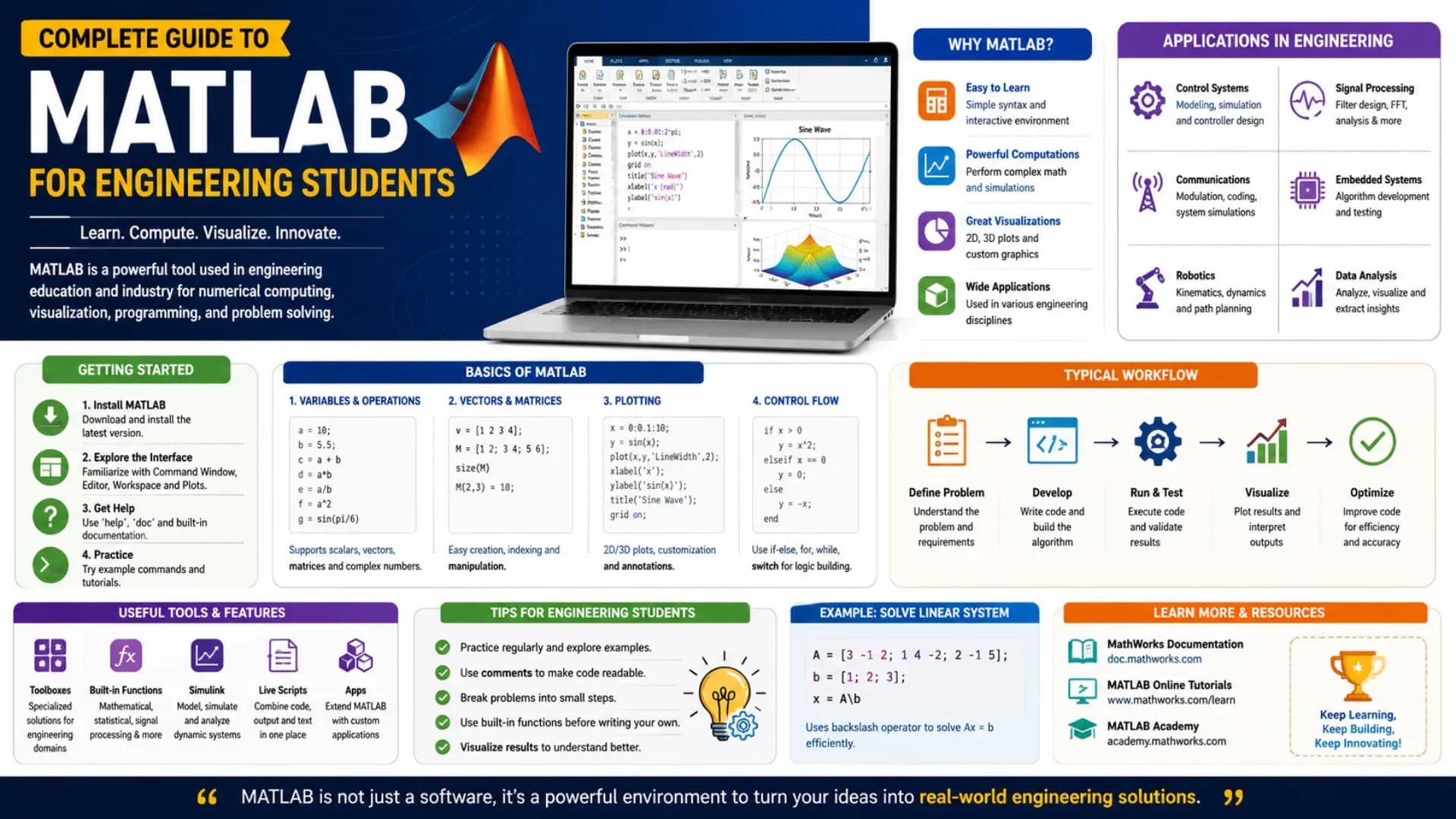
Across mechanical, electrical, electronics, civil, and aerospace engineering departments worldwide, one piece of Engineering Software appears in nearly every core lab and final-year project: MATLAB. This MATLAB Tutorial is built specifically for MATLAB for Engineering Students who need to go from zero familiarity to genuine working competence — covering syntax, matrix operations, plotting, data analysis, the Simulink simulation environment, and a complete roadmap for project-ready skills. Whether you are encountering MATLAB for the first time in a numerical methods course or trying to Learn MATLAB 2026 ahead of a final-year project, this guide gives you the structured MATLAB Programming Guide content with real, runnable code at every step.
What We Cover
- Why MATLAB Dominates Engineering Curricula
- MATLAB for Beginners — Syntax, Variables, and Matrices
- Plotting and Visualization — Making Sense of Data
- MATLAB Data Analysis — Statistics, Curve Fitting, and Signal Processing
- MATLAB Simulink Tutorial — Visual Block-Diagram Simulation
- MATLAB Applications Across Engineering Branches
- MATLAB Projects to Build Real Competence
- MATLAB Learning Roadmap — 10-Week Path
Why MATLAB Dominates Engineering Curricula
Among all the Engineering Software tools a student encounters across a degree, MATLAB occupies a distinct position: it is simultaneously a programming language, a numerical computing environment, and a visualization tool, purpose-built around matrix operations that map directly onto the mathematics taught in engineering courses — linear algebra, differential equations, signal processing, and control systems.
This matters practically because most engineering problems are naturally expressed as matrix and vector operations — a system of simultaneous equations describing circuit currents, a set of forces acting on a structure, or a discretised version of a differential equation. MATLAB's syntax is designed so that these operations look almost identical to how they appear on paper, which dramatically lowers the barrier between understanding a concept mathematically and implementing it computationally.
Industry relevance reinforces this academic dominance: MATLAB and its companion product Simulink are used extensively in automotive (control systems, ADAS development), aerospace, robotics, power systems, and signal processing industries — meaning the skills built in coursework transfer directly to real engineering roles rather than remaining purely academic exercises.
MATLAB for Beginners — Syntax, Variables, and Matrices
Every MATLAB for Beginners journey starts with the same foundational concept: everything in MATLAB is fundamentally a matrix, even a single number (a 1×1 matrix). Understanding this from day one prevents a lot of confusion later.
Variables and Basic Operations
% Scalars, vectors, and matrices - all are matrices in MATLAB
x = 5;                  % 1x1 matrix (scalar)
v = [1, 2, 3, 4];        % 1x4 row vector
w = [1; 2; 3; 4];        % 4x1 column vector
A = [1, 2; 3, 4];        % 2x2 matrix

disp(size(A))            % Output: 2  2

% Element-wise vs matrix operations - a critical distinction
B = [5, 6; 7, 8];
C_elementwise = A .* B;  % element-by-element multiplication
C_matrix = A * B;        % true matrix multiplication

disp(C_elementwise)      % [5 12; 21 32]
disp(C_matrix)           % [19 22; 43 50]
Creating Sequences and Indexing
% colon operator creates sequences - extremely common in MATLAB code
t = 0:0.1:10;             % from 0 to 10, step 0.1 -> 101 elements
linspace_vec = linspace(0, 10, 50);  % 50 evenly spaced points from 0 to 10

% Indexing - MATLAB uses 1-based indexing, not 0-based
A = [10, 20, 30; 40, 50, 60; 70, 80, 90];
disp(A(1, 1))             % 10 - first row, first column
disp(A(2, :))             % entire second row: [40 50 60]
disp(A(:, 3))             % entire third column: [30; 60; 90]
disp(A(end, end))         % last row, last column: 90
Functions and Control Flow
function result = quadratic_roots(a, b, c)
    % Solves ax^2 + bx + c = 0 and returns both roots
    discriminant = b^2 - 4*a*c;
    if discriminant < 0
        result = "No real roots";
    else
        root1 = (-b + sqrt(discriminant)) / (2*a);
        root2 = (-b - sqrt(discriminant)) / (2*a);
        result = [root1, root2];
    end
end

% Calling the function
roots_found = quadratic_roots(1, -3, 2);
disp(roots_found)         % [2, 1]

% For loop example - summing squares
total = 0;
for i = 1:10
    total = total + i^2;
end
disp(total)               % 385
The element-wise versus matrix operation distinction (`.*` versus `*`) trips up nearly every beginner at some point, and getting it wrong silently produces incorrect results rather than an error in many cases — making it one of the first habits worth internalising carefully in any genuine MATLAB Programming Guide.
Plotting and Visualization — Making Sense of Data
MATLAB's plotting capabilities are one of its strongest practical advantages over plain programming languages for engineering work — visualizing a signal, a system response, or experimental data takes only a few lines of code.
% Basic 2D plotting
t = 0:0.01:2*pi;
y1 = sin(t);
y2 = cos(t);

figure;
plot(t, y1, 'b-', 'LineWidth', 2);
hold on;
plot(t, y2, 'r--', 'LineWidth', 2);
xlabel('Time (s)');
ylabel('Amplitude');
title('Sine and Cosine Waves');
legend('sin(t)', 'cos(t)');
grid on;

% Subplots for comparing multiple signals
figure;
subplot(2, 1, 1);
plot(t, y1);
title('Sine Wave');

subplot(2, 1, 2);
plot(t, y2);
title('Cosine Wave');
This visualization layer is what makes MATLAB particularly suited to engineering work compared to writing equivalent code in a general-purpose language — the ability to instantly see a plotted result and immediately spot whether a simulation behaves as physically expected is core to how engineers actually debug and validate their models.
Related Article: Top MTech Colleges in India
MATLAB Data Analysis — Statistics, Curve Fitting, and Signal Processing
Beyond basic computation, MATLAB Data Analysis capabilities make it a strong tool for processing experimental lab data, sensor readings, and simulation outputs — tasks that come up constantly in engineering coursework and research.
Statistical Analysis of Experimental Data
% Simulated experimental measurements with noise
true_value = 25.0;
measurements = true_value + 0.5 * randn(1, 50);  % 50 noisy measurements

mean_val = mean(measurements);
std_dev = std(measurements);
variance = var(measurements);

fprintf('Mean: %.3f\n', mean_val);
fprintf('Standard Deviation: %.3f\n', std_dev);
fprintf('95%% Confidence Interval: [%.3f, %.3f]\n', ...
    mean_val - 1.96*std_dev/sqrt(50), mean_val + 1.96*std_dev/sqrt(50));
Curve Fitting
% Fitting experimental data to a polynomial - common in lab reports
x_data = [1, 2, 3, 4, 5, 6, 7, 8];
y_data = [2.1, 4.3, 9.2, 15.8, 25.1, 36.4, 49.2, 63.9];  % roughly quadratic

p = polyfit(x_data, y_data, 2);   % fit a 2nd-degree polynomial
x_fit = linspace(1, 8, 100);
y_fit = polyval(p, x_fit);

figure;
plot(x_data, y_data, 'ko', 'MarkerSize', 8);
hold on;
plot(x_fit, y_fit, 'b-', 'LineWidth', 1.5);
legend('Experimental Data', 'Fitted Curve');
fprintf('Fitted equation: y = %.3fx^2 + %.3fx + %.3f\n', p(1), p(2), p(3));
Basic Signal Processing (FFT)
% Frequency analysis of a composite signal using FFT
Fs = 1000;                  % sampling frequency in Hz
t = 0:1/Fs:1-1/Fs;            % 1 second of data
signal = sin(2*pi*50*t) + 0.5*sin(2*pi*120*t);  % 50 Hz + 120 Hz components

Y = fft(signal);
f = (0:length(Y)-1)*Fs/length(Y);

figure;
plot(f(1:length(f)/2), abs(Y(1:length(Y)/2)));
xlabel('Frequency (Hz)');
ylabel('Magnitude');
title('Frequency Spectrum');
% Peaks should appear clearly at 50 Hz and 120 Hz
These three patterns — statistical summary, curve fitting, and frequency-domain analysis via FFT — cover the large majority of MATLAB Data Analysis tasks that appear across mechanical, electrical, and instrumentation-focused lab courses.
MATLAB Simulink Tutorial — Visual Block-Diagram Simulation
While MATLAB itself is a text-based programming environment, Simulink is its companion tool for modelling dynamic systems visually using block diagrams instead of code — and any complete MATLAB Simulink Tutorial needs to introduce this distinct but closely related environment.
Simulink is particularly suited to modelling systems described by differential equations and feedback loops — control systems, electrical circuits, mechanical systems with springs and dampers, and signal processing chains. Rather than writing the differential equation solver yourself, you connect blocks representing integrators, gains, summers, and transfer functions, and Simulink handles the numerical solving underneath.
A typical first MATLAB Simulink Tutorial exercise: modelling a simple mass-spring-damper system. The block diagram connects a Sum block (combining forces), a Gain block (representing 1/mass), two Integrator blocks (converting acceleration to velocity to position), and feedback paths representing the spring force (proportional to position) and damping force (proportional to velocity) — visually mirroring the physical structure of the system being modelled, which is often more intuitive for students than the equivalent state-space equations written in pure code.
Simulink models can also be initiated and configured from MATLAB code directly, bridging the two environments:
% Opening and configuring a Simulink model from MATLAB script
open('mass_spring_damper.slx');   % opens an existing Simulink model

% Setting model parameters programmatically
set_param('mass_spring_damper/Mass', 'Gain', '2.5');
set_param('mass_spring_damper/Spring_Constant', 'Gain', '40');
set_param('mass_spring_damper/Damping', 'Gain', '5');

% Running the simulation and retrieving results
simOut = sim('mass_spring_damper', 'StopTime', '20');
position_data = simOut.get('position');
plot(position_data.Time, position_data.Data);
xlabel('Time (s)'); ylabel('Position (m)');
title('Mass-Spring-Damper System Response');
MATLAB Applications Across Engineering Branches
The breadth of MATLAB Applications across different engineering disciplines is part of why nearly every engineering student encounters this tool regardless of specialisation:
- Electrical and Electronics Engineering: Circuit analysis, signal processing, filter design, communication systems modelling, control system design using transfer functions and state-space models
- Mechanical Engineering: Dynamics simulation, finite element analysis pre/post-processing, vibration analysis, thermal system modelling, robotics kinematics and dynamics
- Civil Engineering: Structural analysis, hydraulics and hydrology modelling, optimisation of structural designs, geotechnical data analysis
- Aerospace Engineering: Flight dynamics simulation, control system design for autopilots, trajectory optimisation, aerodynamic data analysis
- Computer and Electronics Engineering: Image and video processing, machine learning prototyping, embedded system modelling with hardware-in-the-loop testing via Simulink
- Chemical and Biomedical Engineering: Process simulation, reaction kinetics modelling, biomedical signal processing (ECG, EEG analysis)
MATLAB Projects to Build Real Competence
Reading about MATLAB syntax builds vocabulary; building actual MATLAB Projects builds competence. A progression of project ideas suited to different stages of learning:
- Beginner: A scientific calculator with a simple menu interface; a unit converter handling multiple unit systems; a basic grade calculator that reads a list of marks and computes statistics
- Intermediate: A signal generator and analyser that creates and visualises different waveform types with adjustable parameters; an image processing tool implementing edge detection and basic filters; a numerical solver for systems of linear equations with a comparison of different solution methods
- Advanced: A PID controller simulation tuned for a specific physical system model in Simulink; a simple machine learning classifier trained and tested on a real dataset; a finite difference solver for a 2D heat conduction problem with visualisation of temperature distribution over time
The strongest MATLAB Projects for a final-year portfolio combine a genuine engineering problem from your specific branch with all three core MATLAB capabilities covered in this guide: numerical computation, data analysis, and visualization — demonstrating not just MATLAB syntax knowledge but the ability to use it as a complete engineering analysis tool.
MATLAB Learning Roadmap — 10-Week Path
A structured MATLAB Learning Roadmap for a student starting from zero, designed to build toward genuine project capability rather than just syntax familiarity:
| Weeks | Focus Area |
|---|---|
| 1 | MATLAB interface, variables, basic matrix operations, indexing |
| 2 | Control flow (for, while, if), writing and calling functions, scripts vs functions |
| 3 | 2D and 3D plotting, subplots, figure formatting and export |
| 4 | Vectorisation (avoiding unnecessary loops), logical indexing, cell arrays and structures |
| 5 | Linear algebra applications: solving systems of equations, eigenvalues, matrix decompositions |
| 6 | Statistics, curve fitting (polyfit), basic numerical methods (root finding, numerical integration) |
| 7 | Introduction to Simulink: block libraries, building a first simple model, running simulations |
| 8 | Signal processing basics: FFT, filtering, and working with discretised real-world data |
| 9–10 | Apply everything to a complete project from your own engineering branch, combining computation, Simulink modelling, and visualisation |
MATLAB's own documentation, MathWorks' free Onramp courses, and the extensive built-in `help` and `doc` commands within MATLAB itself are sufficient resources to follow this entire MATLAB Learning Roadmap without needing paid external courses — the official documentation is genuinely excellent and should be the first reference whenever a function's exact behaviour is unclear.
MATLAB Simulation — A Worked Example Bringing It Together
To see how these pieces combine in a realistic MATLAB Simulation, consider modelling the cooling of a heated object using Newton's law of cooling — a problem that appears across mechanical, chemical, and electrical thermal management contexts:
% Newton's Law of Cooling: dT/dt = -k(T - T_ambient)
T_ambient = 22;      % ambient temperature, degrees C
T_initial = 95;       % initial object temperature
k = 0.05;             % cooling constant (depends on material/surface)
t_span = 0:1:200;     % time in seconds, 0 to 200

% Analytical solution
T_analytical = T_ambient + (T_initial - T_ambient) * exp(-k * t_span);

% Numerical solution using ODE solver, for comparison
cooling_ode = @(t, T) -k * (T - T_ambient);
[t_numerical, T_numerical] = ode45(cooling_ode, t_span, T_initial);

figure;
plot(t_span, T_analytical, 'b-', 'LineWidth', 2);
hold on;
plot(t_numerical, T_numerical, 'ro', 'MarkerSize', 3);
xlabel('Time (s)');
ylabel('Temperature (\circC)');
title('Newton''s Law of Cooling: Analytical vs Numerical Solution');
legend('Analytical Solution', 'ODE45 Numerical Solution');
grid on;

fprintf('Time to reach 30C: %.1f seconds\n', ...
    -log((30 - T_ambient)/(T_initial - T_ambient))/k);
This single MATLAB Simulation example demonstrates several core capabilities together: defining a physical model, solving it both analytically and numerically using a built-in ODE solver, plotting both results for comparison and validation, and extracting a specific practical answer from the model — exactly the kind of integrated workflow that real engineering coursework and projects require. This MATLAB Tutorial deliberately builds toward this kind of integrated example rather than treating each topic in isolation, because real MATLAB for Engineering Students work always combines multiple capabilities at once. A genuinely useful MATLAB Programming Guide should always end with at least one example like this — students who want to Learn MATLAB 2026 well should aim to build several such integrated examples themselves before considering any topic fully understood.
Also Read: Top MTech Colleges in India
CHECK OUT: Top Colleges in Ranchi
Explore More
Conclusion
This MATLAB Tutorial has walked through everything a student needs to begin building genuine competence — fundamental syntax for MATLAB for Beginners, plotting and visualization, MATLAB Data Analysis through statistics and curve fitting and signal processing, the visual modelling environment covered in this MATLAB Simulink Tutorial, and the breadth of MATLAB Applications spanning every major engineering branch.
As you work to Learn MATLAB 2026 and beyond, prioritise building actual MATLAB Projects over passively reading syntax references — the worked MATLAB Simulation example in this guide shows exactly the kind of integrated, applied workflow that turns textbook knowledge into a genuinely useful engineering skill. Among all the Engineering Software tools you will encounter across your degree, MATLAB rewards sustained, applied practice more than almost any other — follow the MATLAB Learning Roadmap consistently, and the competence you build will serve you well beyond any single course, lab, or final-year project.