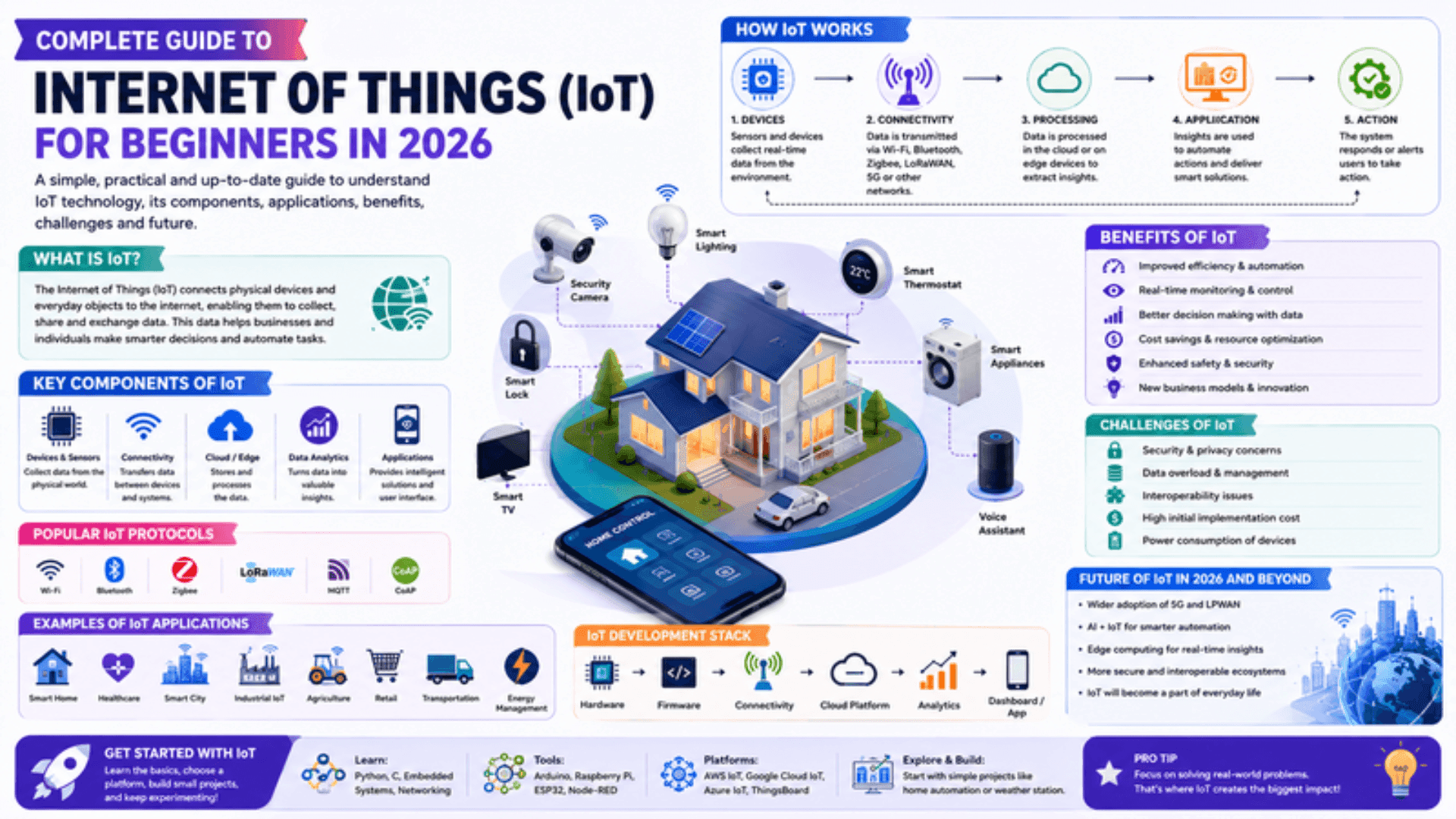
The Internet of Things is the fastest-growing computing paradigm of the 2020s — by 2026, more than 17 billion connected devices are operating globally, generating more data per day than the entire internet produced in 2010. Sensors in factories detect equipment failures before they happen. Smart meters in homes report energy usage in real time. Agricultural sensors monitor soil moisture across thousands of hectares. Medical wearables transmit patient vitals continuously. IoT is not a niche technology; it is the infrastructure layer that makes the physical world programmable. This IoT Tutorial 2026 is your complete Internet of Things Guide for beginners and intermediate learners: covering IoT Architecture, hardware and IoT Devices, IoT Communication Protocols, programming Smart Devices, real-world IoT Applications, security fundamentals, and a complete IoT Career Guide and IoT Learning Roadmap. Whether you are a software engineer looking to move into embedded and connected systems, an electronics enthusiast building your first project, or a student navigating the Internet of Things Tutorial landscape — this is your complete guide to Learn IoT in 2026.
Related Article: Top BTech Colleges in India 2026
Table of Contents
- IoT Architecture — The Four-Layer Model
- IoT Devices and Hardware — Microcontrollers, SBCs, and Sensors
- IoT Communication Protocols — MQTT, HTTP, CoAP, and Zigbee
- Programming Smart Devices — MicroPython and Arduino
- IoT Applications — Real-World Deployments in 2026
- IoT Security — Why It Matters and How to Implement It
- IoT Career Guide and IoT Learning Roadmap
IoT Architecture — The Four-Layer Model
Understanding IoT Architecture is the first step to Learn IoT seriously. Every IoT system — from a single temperature sensor to an industrial factory monitoring platform — follows the same fundamental architecture, even when it differs in scale and complexity.
# The Four-Layer IoT Architecture:
#
# LAYER 1 — PERCEPTION (Device / Sensor Layer)
#   Physical devices that sense or actuate the real world
#   Sensors:   temperature, humidity, pressure, motion, light, gas, GPS
#   Actuators: motors, relays, LEDs, solenoids, speakers, displays
#   Hardware:  Arduino, ESP32, STM32, Raspberry Pi, custom PCBs
#   Constraint: limited CPU (MHz), RAM (KB), power (battery-operated)
#
# LAYER 2 — NETWORK (Connectivity Layer)
#   Moves data from devices to the cloud (or edge) and vice versa
#   Short range:  Bluetooth LE, Zigbee, Z-Wave, Wi-Fi, NFC, RFID
#   Long range:   LoRaWAN, NB-IoT, LTE-M, Sigfox
#   Protocols:    MQTT, CoAP, HTTP/2, WebSockets, AMQP
#   Concern:      reliability, energy consumption, bandwidth cost
#
# LAYER 3 — PROCESSING (Edge + Cloud Layer)
#   Where data is stored, processed, and analysed
#   Edge computing: process near the device (reduces latency + bandwidth)
#     Platforms: AWS Greengrass, Azure IoT Edge, NVIDIA Jetson
#   Cloud computing: store and analyse at scale
#     Platforms: AWS IoT Core, Azure IoT Hub, Google Cloud IoT, ThingsBoard
#   Rule engines, stream processing, time-series databases (InfluxDB, TimescaleDB)
#
# LAYER 4 — APPLICATION (User Interface Layer)
#   The dashboard, alert, or automation that a human or system uses
#   Dashboards: Grafana, Node-RED, Tableau, custom web apps
#   Alerts:     SMS, email, push notification, PagerDuty
#   Automation: if temperature > 80°C → trigger cooling system

iot_architecture_example = {
    "scenario": "Smart greenhouse monitoring",
    "perception": {
        "devices": ["ESP32 + DHT22 (temperature/humidity)",
                    "Soil moisture sensor", "LDR light sensor"],
        "sampling_interval": "every 60 seconds",
    },
    "network": {
        "protocol": "MQTT over Wi-Fi",
        "broker":   "HiveMQ Cloud",
        "topics":   ["greenhouse/sensor/temp", "greenhouse/sensor/humidity"],
    },
    "processing": {
        "cloud":  "AWS IoT Core → Lambda → InfluxDB",
        "rules":  ["humidity < 40% → trigger irrigation",
                   "temperature > 35°C → open vents"],
    },
    "application": {
        "dashboard": "Grafana real-time charts",
        "alerts":    "WhatsApp notification via Twilio API",
    }
}
for layer, details in iot_architecture_example.items():
    print(f"\n{layer.upper()}: {details}")
IoT Devices and Hardware — Microcontrollers, SBCs, and Sensors
Choosing the right hardware is the most consequential decision in an IoT project. The spectrum runs from tiny microcontrollers that run on a coin battery for years to full Linux computers that can run machine learning models at the edge. IoT for Beginners should start with a specific device rather than trying to understand all of them simultaneously.
# IoT Hardware Selection Guide — matching hardware to use case:
#
# MICROCONTROLLERS (MCUs) — constrained; no OS; battery-friendly:
#
# Arduino Uno / Mega (ATmega328P / ATmega2560)
#   RAM: 2KB / 8KB | Flash: 32KB / 256KB
#   Best for: learning electronics, simple sensor reading, motor control
#   No Wi-Fi/BT built in — add ESP8266 shield or use Arduino Nano 33 IoT
#   Cost: ₹400–900 (clone) / ₹2,000–4,000 (official)
#
# ESP32 (Espressif — the workhorse of IoT in 2026)
#   RAM: 520KB SRAM | Flash: 4–16MB | Dual-core 240MHz
#   Wi-Fi + Bluetooth 5.0 built in
#   Best for: Wi-Fi connected sensors, BLE beacons, home automation
#   Cost: ₹200–500 | Widely available on Robu.in, Evelta, Tomson
#   WHY: best cost-to-capability ratio for Wi-Fi IoT projects in India
#
# ESP8266 (NodeMCU)
#   Cheaper than ESP32; Wi-Fi only; single core; less GPIO
#   Best for: simple Wi-Fi data upload projects; cost-sensitive deployments
#   Cost: ₹100–300
#
# STM32 (STMicroelectronics)
#   Industrial-grade; real-time capabilities; very low power
#   Best for: professional embedded firmware, RTOS applications, automotive
#   Steeper learning curve; used in professional embedded engineering
#
# SINGLE-BOARD COMPUTERS (SBCs) — Linux OS; higher capability:
#
# Raspberry Pi 4 / Pi 5
#   4-8GB RAM | Quad-core 1.8GHz | USB, HDMI, GPIO, camera
#   Best for: edge ML inference, home servers, Node-RED automation hubs
#   Cost: ₹4,500–12,000
#
# SENSORS — common types and what they measure:
common_sensors = {
    "DHT22":      "Temperature (-40 to 80°C) and humidity (0–100%); ±0.5°C",
    "BME280":     "Temperature + humidity + atmospheric pressure; I2C/SPI",
    "HC-SR04":    "Ultrasonic distance measurement (2cm – 4m)",
    "PIR HC-SR501":"Passive infrared motion detection; adjustable range",
    "MQ-2":       "LPG, propane, hydrogen, smoke gas detection",
    "MPU-6050":   "6-axis IMU: 3-axis gyroscope + 3-axis accelerometer; I2C",
    "NEO-6M GPS": "GPS module; NMEA output; 2.5m accuracy",
    "DS18B20":    "Waterproof temperature probe; 1-Wire protocol; pipeline/liquid",
}
for sensor, desc in common_sensors.items():
    print(f"  {sensor:15} → {desc}")
IoT Communication Protocols — MQTT, HTTP, CoAP, and Zigbee
IoT Communication Protocols are the languages that devices use to talk to each other and to the cloud. Choosing the right protocol is a trade-off between power consumption, bandwidth, range, latency, and implementation complexity.
# IoT Communication Protocols — complete comparison:
#
# APPLICATION LAYER PROTOCOLS:
#
# MQTT (Message Queuing Telemetry Transport)
#   THE dominant IoT protocol for constrained devices
#   Publish-subscribe model: devices publish to topics; subscribers receive
#   Broker: Mosquitto (self-hosted), HiveMQ, AWS IoT Core, EMQX
#   QoS levels: 0 (fire-and-forget), 1 (at least once), 2 (exactly once)
#   Overhead: ~2 byte header — ideal for slow/unreliable networks
#   Port: 1883 (plain) / 8883 (TLS)
#   Best for: sensor telemetry, real-time monitoring, command-and-control
#
# CoAP (Constrained Application Protocol)
#   Like HTTP but binary + UDP — designed for constrained devices
#   REST-style: GET, POST, PUT, DELETE on resources
#   Supports multicast — one command to many devices simultaneously
#   Best for: very constrained devices where MQTT is too heavy
#

# HTTP/HTTPS
#   Simple; every developer knows it; large overhead for small payloads
#   Best for: devices with adequate resources (ESP32, Pi); API integrations
#   Not suitable for battery-powered devices that send frequent small messages
#
# WIRELESS PROTOCOLS:
wireless_protocols = {
    "Wi-Fi (2.4/5GHz)": {
        "range": "20-50m indoor", "power": "High",
        "bandwidth": "High (Mbps)", "use": "Home automation, streaming cameras"},
    "Bluetooth LE 5.x": {
        "range": "10-100m", "power": "Very low",
        "bandwidth": "2 Mbps", "use": "Wearables, beacons, medical devices"},
    "Zigbee (IEEE 802.15.4)": {
        "range": "10-100m mesh", "power": "Very low",
        "bandwidth": "250 kbps", "use": "Smart home (Philips Hue), industrial mesh"},
    "LoRaWAN": {
        "range": "2-15km", "power": "Ultra-low",
        "bandwidth": "0.3–50 kbps", "use": "Agriculture, smart city, asset tracking"},
    "NB-IoT": {
        "range": "10+ km (cellular)", "power": "Very low",
        "bandwidth": "~250 kbps", "use": "Smart meters, parking sensors (uses 4G towers)"},
}
for proto, specs in wireless_protocols.items():
    print(f"  {proto:22} → range:{specs['range']:18} power:{specs['power']:12} {specs['use']}")
Programming Smart Devices — MicroPython and Arduino
Smart Devices require firmware — the code that runs directly on the microcontroller. The two dominant approaches for beginners are Arduino (C/C++) and MicroPython (Python on microcontrollers). Both are excellent; Python engineers should start with MicroPython on the ESP32.
# MicroPython on ESP32 — Read DHT22 sensor and publish via MQTT
# Flash MicroPython firmware: esptool.py --port /dev/ttyUSB0 write_flash 0x0 firmware.bin
# Then use Thonny IDE or rshell to upload files to the device

import network
import machine
from umqtt.simple import MQTTClient
import dht, json, time

# Configuration — store in config.json on the device, not hardcoded:
WIFI_SSID     = "YourSSID"
WIFI_PASS     = "YourPassword"
MQTT_BROKER   = "broker.hivemq.com"
MQTT_PORT     = 1883
MQTT_TOPIC    = b"iot/greenhouse/sensor1"
DEVICE_ID     = "esp32-greenhouse-01"
INTERVAL_SEC  = 60

def connect_wifi():
    wlan = network.WLAN(network.STA_IF)
    wlan.active(True)
    if not wlan.isconnected():
        print("Connecting to Wi-Fi...")
        wlan.connect(WIFI_SSID, WIFI_PASS)
        timeout = 15
        while not wlan.isconnected() and timeout > 0:
            time.sleep(1); timeout -= 1
    if wlan.isconnected():
        print(f"Wi-Fi connected: {wlan.ifconfig()[0]}")
    else:
        raise OSError("Wi-Fi connection failed")

def read_sensor(pin_num: int = 4):
    sensor = dht.DHT22(machine.Pin(pin_num))
    sensor.measure()
    return {
        "temperature_c": sensor.temperature(),
        "humidity_pct":  sensor.humidity(),
        "device_id":     DEVICE_ID,
        "timestamp_ms":  time.ticks_ms(),
    }

def publish_reading(client: MQTTClient, reading: dict):
    payload = json.dumps(reading).encode()
    client.publish(MQTT_TOPIC, payload, qos=1)  # QoS 1: at least once delivery
    print(f"Published: {payload}")

def main():
    connect_wifi()
    client = MQTTClient(DEVICE_ID, MQTT_BROKER, MQTT_PORT)
    client.connect()
    print("MQTT connected. Starting sensor loop...")
    while True:
        try:
            reading = read_sensor()
            publish_reading(client, reading)
        except OSError as e:
            print(f"Sensor error: {e} — retrying next cycle")
        time.sleep(INTERVAL_SEC)

main()
// Arduino (C++) — Read DHT22 and send to Node.js server via HTTP POST
// Install libraries: DHT sensor library, ESP8266HTTPClient or HTTPClient (ESP32)
// #include <WiFi.h> // ESP32
// #include <HTTPClient.h> // ESP32 HTTP
// #include <DHT.h> // DHT sensor
// #include <ArduinoJson.h> // JSON serialisation
//
// const char* ssid = "YourSSID";
// const char* password = "YourPassword";
// const char* endpoint = "https://api.yourserver.com/v1/readings";
//
// DHT dht(4, DHT22); // pin 4, DHT22 type
//
// void setup() {
// Serial.begin(115200);
// WiFi.begin(ssid, password);
// while (WiFi.status() != WL_CONNECTED) { delay(500); }
// dht.begin();
// }
//
// void loop() {
// float temp = dht.readTemperature();
// float humi = dht.readHumidity();
// if (isnan(temp) || isnan(humi)) { delay(2000); return; }
//
// StaticJsonDocument<200> doc;
// doc["temperature"] = temp;
// doc["humidity"] = humi;
// doc["device_id"] = "esp32-001";
//
// String payload;
// serializeJson(doc, payload);
//
// HTTPClient http;
// http.begin(endpoint);
// http.addHeader("Content-Type", "application/json");
// int code = http.POST(payload);
// Serial.printf("HTTP %d\\n", code);
// http.end();
// delay(60000); // 60 seconds between readings
// }
# Arduino vs MicroPython — when to choose which:
comparison = {
"MicroPython": {
"best_for": "Python developers; rapid prototyping; REPL on device",
"boards": "ESP32, ESP8266, Raspberry Pi Pico, Pyboard",
"pros": "Fast iteration; Python syntax; no compile step",
"cons": "Slower execution; more RAM overhead than C",
},
"Arduino (C++)": {
"best_for": "Production firmware; minimal resource constraints; large community",
"boards": "Any Arduino-compatible (Uno, Nano, ESP32, MKR, STM32)",
"pros": "Faster execution; huge library ecosystem; industry standard",
"cons": "C++ learning curve; compile-flash cycle slower than REPL",
},
}Also Read: Top MTech Colleges in India 2026
IoT Applications — Real-World Deployments in 2026
The IoT Applications landscape in 2026 spans every sector of the economy. Understanding the deployment patterns across industries helps you identify where your skills are most valuable.
# IoT Applications by sector — 2026 deployment status:
iot_applications = {
    "Industrial IoT (IIoT)": {
        "applications": [
            "Predictive maintenance — vibration + temperature sensors on motors",
            "Real-time production line monitoring — OEE dashboards",
            "Asset tracking — RFID + GPS on tools and parts",
            "Energy management — submetering every machine, not just the facility",
        ],
        "platforms": "Siemens MindSphere, PTC ThingWorx, GE Predix, AWS IoT",
        "India context": "Manufacturing sector under Industry 4.0 push (PLI schemes)",
    },
    "Smart Agriculture": {
        "applications": [
            "Soil moisture + NPK sensors → automated drip irrigation",
            "Weather stations every 2km → hyperlocal pest forecast models",
            "Drone-mounted multispectral cameras → crop health mapping",
            "Cold chain monitoring — temperature loggers in produce transport",
        ],
        "India context": "ICAR, Mahindra AgriTech, CropIn, Fasal deploying at scale",
    },
    "Smart Cities": {
        "applications": [
            "Smart street lighting — LED dimming on occupancy sensors",
            "Waste bin fill-level sensors → optimised collection routes",
            "Air quality monitoring — PM2.5, NO2, CO2 at 500m intervals",
            "Smart parking — ultrasonic sensors under every spot",
        ],
        "India context": "Smart Cities Mission — 100 cities deploying IoT infrastructure",
    },
    "Healthcare IoT": {
        "applications": [
            "Wearables — ECG, SpO2, continuous glucose monitoring (CGM)",
            "Hospital asset tracking — IV pump location, crash cart availability",
            "Remote patient monitoring — post-discharge vitals via home sensors",
        ],
        "India context": "AIIMS tele-ICU, Portea, Niramai deploying healthcare IoT",
    },
    "Smart Homes": {
        "applications": [
            "Energy management — smart plugs + solar + battery optimisation",
            "Security — door/window sensors, motion, video doorbells",
            "Comfort automation — HVAC, lighting, blinds on schedules/occupancy",
        ],
        "India context": "Anchor Panasonic, Wipro Lighting, Atomberg, Legrand active",
    },
}
for sector, info in iot_applications.items():
    print(f"\n{sector}: {info['India context']}")
IoT Security — Why It Matters and How to Implement It
IoT security is the most consistently neglected dimension of IoT for Beginners education — and the dimension with the most catastrophic real-world consequences. A compromised IoT device is not just a privacy issue; it is a physical safety issue, a network intrusion vector, and potentially a component in a DDoS botnet.
# IoT Security — the most critical vulnerabilities and their mitigations:
#
# 1. DEFAULT CREDENTIALS (the most exploited single vulnerability in IoT):
#    The Mirai botnet (2016) compromised 600,000 IoT devices by trying 61
#    default username/password combinations. Devices used in the attack
#    included CCTV cameras and routers still running factory defaults.
#    Mitigation: FORCE credential change on first boot. Physically impossible
#    to use the device without setting a new password.
#
# 2. UNENCRYPTED COMMUNICATION:
#    Plain HTTP or MQTT on port 1883 transmits data in cleartext.
#    An attacker on the same network sees temperature readings — and commands.
#    Mitigation: TLS everywhere. MQTT on 8883. HTTPS only. Certificate pinning
#    for critical devices.
#
# 3. NO OTA UPDATE MECHANISM (devices stuck on vulnerable firmware forever):
#    A device with no update mechanism ships its vulnerability until end-of-life.
#    Mitigation: build OTA (Over-The-Air) update into every connected device.
#    ESP32 with MicroPython: webrepl or custom HTTPS update endpoint.
#    Sign firmware — never accept unsigned updates.
#
# 4. HARDCODED CREDENTIALS IN FIRMWARE:
#    Wi-Fi passwords, API keys, or cloud credentials in the binary.
#    Attacker reads flash → extracts all secrets.
#    Mitigation: store credentials in NVS (Non-Volatile Storage) partition,
#    not in code. Use device provisioning (AWS IoT Fleet Provisioning).
#
# 5. EXCESSIVE NETWORK EXPOSURE:
#    IoT devices on the same network as PCs → lateral movement attack vector.
#    Mitigation: IoT VLAN isolation. Devices talk only to their cloud broker,
#    not to other network segments.

# Secure MQTT connection — using TLS certificates in MicroPython:
import ssl, network
from umqtt.simple import MQTTClient

def secure_mqtt_connect(broker: str, device_id: str,
                          ca_cert_path: str = "ca.crt") -> MQTTClient:
    """Connect to MQTT broker with TLS — always use this in production."""
    with open(ca_cert_path, "rb") as f:
        ca_cert = f.read()
    ssl_ctx = ssl.SSLContext(ssl.PROTOCOL_TLS_CLIENT)
    ssl_ctx.load_verify_locations(cadata=ca_cert)
    client = MQTTClient(
        client_id=device_id,
        server=broker,
        port=8883,       # TLS port, NOT 1883
        ssl=ssl_ctx,
        keepalive=30,
    )
    client.connect()
    return client

# IoT Security Checklist — before shipping any IoT device:
security_checklist = [
    "✓ No default credentials — forced change on first boot",
    "✓ All communication over TLS (MQTT:8883, HTTPS)",
    "✓ Credentials in NVS / provisioning, not hardcoded in firmware",
    "✓ OTA update mechanism with firmware signature verification",
    "✓ Device on isolated IoT VLAN, not on main network",
    "✓ Minimal open ports — close everything not explicitly needed",
    "✓ Unique device identity — individual X.509 cert per device, not shared key",
    "✓ Watchdog timer — device reboots if firmware hangs",
]
for item in security_checklist:
    print(item)
IoT Career Guide and IoT Learning Roadmap
# IoT Career Guide — roles and India salary ranges (2026):
#
# EMBEDDED FIRMWARE ENGINEER:
#   Write C/C++ firmware for microcontrollers and SoCs
#   Skills: C/C++, RTOS (FreeRTOS, Zephyr), hardware debugging, oscilloscope
#   Salary: ₹6–18 LPA (junior) | ₹18–40 LPA (senior)
#   Companies: Bosch, Robert Bosch Engineering, Continental, Qualcomm India,
#              Texas Instruments, STMicroelectronics, Marvell, Samsung R&D
#
# IoT PLATFORM / BACKEND ENGINEER:
#   Build the cloud infrastructure that ingests, stores, and processes IoT data
#   Skills: Python/Node.js, AWS/Azure IoT services, Kafka, InfluxDB, MQTT
#   Salary: ₹10–25 LPA (mid) | ₹25–55 LPA (senior)
#   Companies: Siemens (Pune), Schneider Electric, Honeywell, ABB India,
#              L&T Technology Services, Tata Elxsi, HCL Tech, Wipro IoT
#
# IoT SOLUTIONS ENGINEER / ARCHITECT:
#   Design end-to-end IoT systems from sensors to dashboards
#   Skills: full-stack IoT (hardware + networking + cloud + UI), customer-facing
#   Salary: ₹18–50 LPA
#

# SMART HOME / PRODUCT IoT ENGINEER:
#   Build consumer IoT products — wearables, appliances, home automation
#   Companies: Ather Energy, Ola Electric, Atomberg, boAt, Noise, Inteliconect
#   Salary: ₹8–30 LPA; equity-rich at startup stage
#
# AGRICULTURAL IoT / RURAL TECH:
#   Build IoT systems for farming — India-specific growth sector
#   Companies: Fasal, CropIn, Stellapps (dairy), Intello Labs, Ninjacart
#   Salary: ₹6–20 LPA; mission-driven work; high impact
# IoT Learning Roadmap — 12 months from beginner to job-ready:
#
# MONTHS 1–2 — Hardware Fundamentals:
# ✓ Buy: ESP32 dev board + DHT22 + breadboard + jumper wires (~₹800 total)
# ✓ Learn: basic electronics — voltage, current, resistance, Ohm's law
# ✓ Flash MicroPython on ESP32 (esptool); open Thonny; blink an LED
# ✓ Build: temperature + humidity reader that prints to serial monitor
# ✓ Learn: I2C and SPI protocols — add a BME280 sensor
#
# MONTHS 3–4 — Networking and MQTT:
# → Connect ESP32 to Wi-Fi; send HTTP POST to a free webhook (Webhook.site)
# → Install Mosquitto broker locally; publish/subscribe from ESP32
# → Subscribe from Python script on PC; log readings to SQLite
# → Build: sensor → MQTT → Python subscriber → CSV log → matplotlib plot
#
# MONTHS 5–6 — Cloud Integration:
# → AWS IoT Core free tier: register device, create Thing, publish from ESP32
# → Lambda function triggered by IoT rule → stores to DynamoDB
# → Grafana Cloud (free): connect InfluxDB; build a live dashboard
# → ThingsBoard.io (free open-source): full IoT dashboard without AWS
#
# MONTHS 7–9 — Edge Computing and Scale:
# → Raspberry Pi: run Node-RED; create visual automation flows
# → Edge ML: run TensorFlow Lite model on Pi for anomaly detection
# → LoRaWAN: add a RAK811 LoRa module; connect to The Things Network
# → Implement TLS everywhere; write the security checklist for your project
#
# MONTHS 10–12 — Portfolio Project and Job Search:
# → Build one complete IoT system: 3+ sensors, MQTT, cloud, dashboard, alert
# → Document it: circuit diagram (Fritzing), architecture diagram, GitHub README
# → Certifications: AWS IoT Specialty, Google Cloud IoT, Coursera IoT Specialisation
# → Communities: Hackster.io, Element14 Community, IoT India Forum
# → Apply: L&T Tech Services, Tata Elxsi, Bosch India, Siemens Pune,
# startups on AngelList India (filter: IoT, hardware, embedded)
# Essential resources to Learn IoT:
resources = {
"Random Nerd Tutorials": "randomnerdtutorials.com — best ESP32/Arduino + IoT site",
"Andreas Spiess (YouTube)":'#TheGuyWithTheSwissAccent — rigorous IoT engineering videos',
"Coursera IoT Spec": "UC San Diego — beginner-friendly; covers all layers",
"Hackster.io": "Project showcase + tutorials; find India-specific builds",
"MQTT Essentials": "hivemq.com/mqtt-essentials — definitive MQTT guide; free",
"ESP-IDF docs": "docs.espressif.com — official Espressif documentation",
}The most important single habit for learning IoT: Build hardware, not just software. The moment that separates IoT engineers from web engineers is the first time they wire a sensor to a board, see unexpected readings, and have to reason about whether the fault is in the code, the wiring, the sensor, the power supply, or the protocol. That debugging experience — physical and digital simultaneously — is what IoT engineering actually is. Buy a ₹300 ESP32 and a ₹50 DHT22 sensor and start today.
CHECK OUT: Top Colleges in Ranchi 2026
Explore More
Conclusion
This IoT Tutorial 2026 has covered the complete landscape: the four-layer IoT Architecture with a real greenhouse monitoring example, the hardware spectrum from ESP32 to Raspberry Pi with India-specific pricing and sourcing, the complete IoT Communication Protocols guide from MQTT to LoRaWAN, full working MicroPython and Arduino firmware for reading sensors and publishing data, real IoT Applications across industrial, agricultural, healthcare, and smart city sectors with India-specific deployments, the eight-point security checklist every Internet of Things Guide should enforce, and the complete IoT Career Guide and IoT Learning Roadmap with India salary data.
The Internet of Things Tutorial you have read is a map — the territory is the physical world of sensors and actuators and protocols and power constraints and firmware bugs and cloud pipelines. Learn IoT by building IoT: wire a sensor to an ESP32, flash MicroPython, read the data, publish it to MQTT, subscribe from Python, store it in a time-series database, visualise it in Grafana. That sequence is your first complete IoT for Beginners project. Every IoT system in the world — from a factory floor sensor network to a smart city air quality grid — is a scaled version of that same sequence. Master the sequence, then scale it. This Internet of Things Guide gives you the foundation; the hardware on your workbench gives you the expertise. This IoT Tutorial 2026 is your reference for every layer of that journey — revisit each section of this IoT Tutorial 2026 when the corresponding challenge is live in your project. The Internet of Things Tutorial that builds careers is not the one you read — it is the one you implement, break, debug, and ship. Return to this Internet of Things Tutorial when you need the protocol comparison, the security checklist, or the hardware selection guide. The IoT Tutorial 2026 ecosystem is your starting point; the connected world is your classroom.