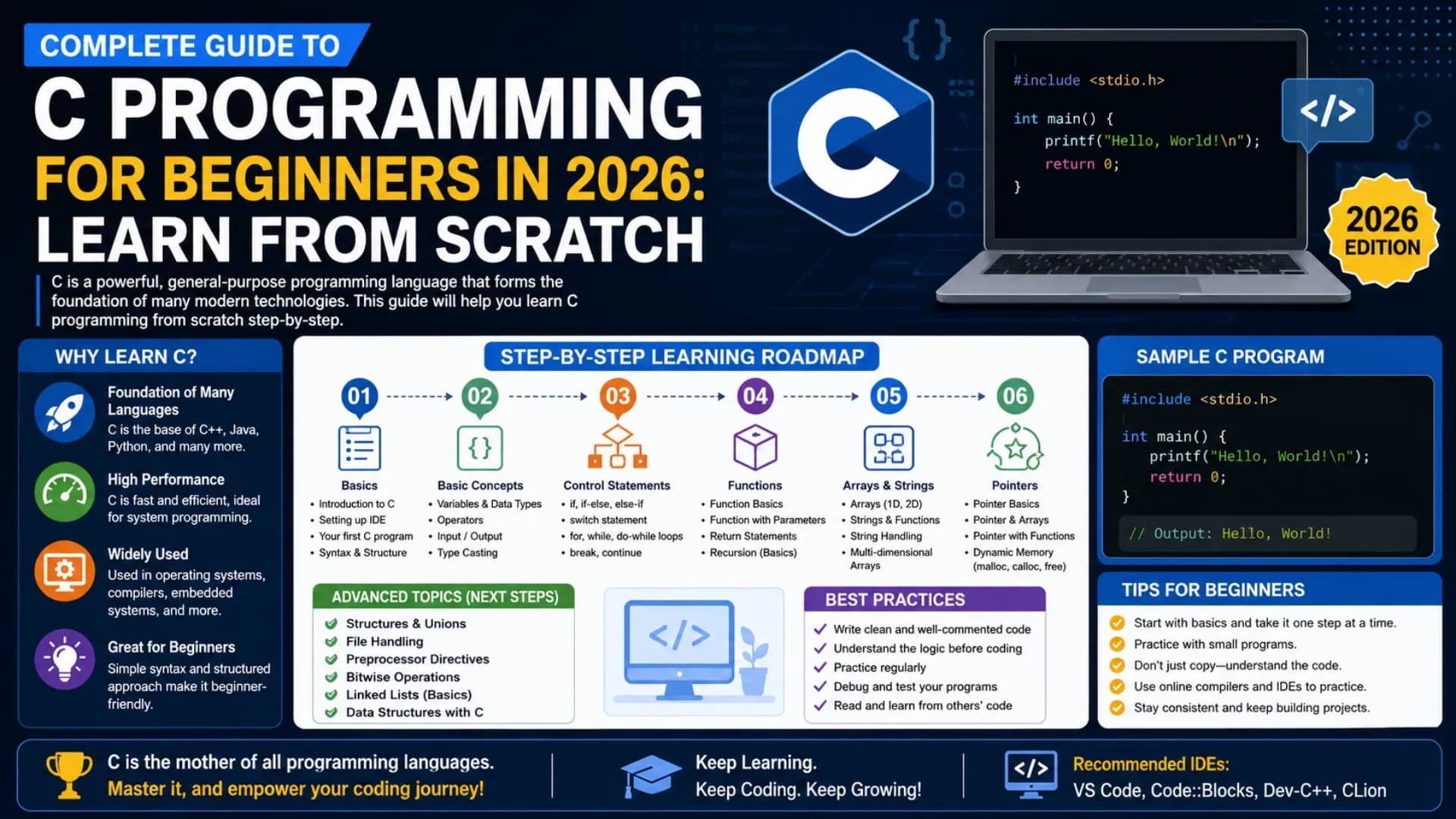
Complete Guide to C Programming for Beginners in 2026: Learn From Scratch
C is not just one of the oldest programming languages — it is the foundation on which nearly every modern operating system, embedded system, compiler, and systems-level software is built. This C programming tutorial is designed to help students, aspiring developers, and complete beginners understand C from the ground up, with clear explanations and practical code examples that build real understanding, not just surface familiarity.
If you want to learn C programming with genuine depth, you need more than just printf and scanf. A complete C programming for beginners journey requires a solid understanding of C programming basics — variables, data types, operators, control flow — along with the concepts that make C uniquely powerful: pointers in C, memory management, functions, arrays, structures, and file handling. This C language guide 2026 covers all of it, step by step.
This C language tutorial will take you from your very first line of code to writing real programs that manage memory, manipulate data structures, and perform meaningful computational tasks. Whether you are a first-year engineering student, someone beginning programming for beginners from scratch, or a developer who wants to understand how higher-level languages actually work under the hood — this guide on learn coding with C will give you the clearest, most practical path forward.
Related Article: Top B.Tech Colleges in India: Fees, Admission & Ranking 2026
Table of Contents
- What is C Programming?
- Why Learn C Programming in 2026?
- C Programming Basics: Variables, Data Types, and Operators
- Control Flow: Conditionals and Loops
- Functions in C
- Arrays and Strings
- Pointers in C: The Most Important Concept
- Structures and Unions
- File Handling in C
- C Programming Examples and Projects for Practice
- FAQs
- Conclusion
What is C Programming?
C is a general-purpose, procedural programming language developed by Dennis Ritchie at Bell Labs in the early 1970s. It was designed to write operating systems — the UNIX operating system was almost entirely rewritten in C — and it has since become one of the most widely used and influential languages in the history of computing. Every modern language you can name — Python, Java, C++, JavaScript, Go — either descended from C directly or was fundamentally influenced by it.
When you run a program on any device — a PC, a microcontroller, a router, a car's engine management system — there is a very strong chance that C code is running somewhere in that stack. Embedded systems, operating system kernels, database engines, compilers, and network drivers are all primary domains of C programming. This makes learn C programming one of the most foundational investments any serious programmer can make.
A complete C language tutorial should not just teach syntax — it should show you how C thinks: close to the hardware, explicit about memory, unforgiving of ambiguity, and extraordinarily powerful when used correctly. Unlike high-level languages that hide memory management behind garbage collectors and abstract data types, C puts you directly in charge. That directness is what makes C programming for beginners challenging at first — and deeply rewarding once it clicks.
Also Read: Top AI Skills Students Must Learn in 2026
Why Learn C Programming in 2026?
In a world of Python notebooks and JavaScript frameworks, the question of why beginners should learn C programming in 2026 deserves a direct answer. C remains one of the most in-demand languages for systems programming, embedded development, competitive programming, and foundational computer science education. Engineering colleges across India and globally still teach C as the first programming language — and for very good reason.
Understanding C programming basics teaches you things that higher-level language users never fully learn: how variables are stored in memory, what a pointer actually is and why it matters, how function call stacks work, why buffer overflows happen, and how the abstractions of modern software are built from primitive hardware operations. This foundational understanding makes you a better programmer in every language you learn afterward.
This C language guide 2026 is built around the reality that the language is not declining — it is the backbone of IoT, robotics, automotive software, aerospace systems, and the Linux kernel that powers most of the internet's servers. For anyone serious about programming for beginners who wants more than surface-level scripting ability, C is the most honest starting point available.
C Programming Basics: Variables, Data Types, and Operators
Every journey to learn C programming from scratch starts with the fundamentals: how to store data, what kinds of data C understands, and how to perform operations on that data. These C programming basics are the vocabulary of every C program you will ever write.
Your First C Program
#include <stdio.h>

int main() {
    printf("Hello, World!\n");
    return 0;
}
Every C program starts with #include directives that pull in standard libraries, a main() function that serves as the program's entry point, and a return 0 that tells the operating system the program completed successfully. This structure is the foundation of every C programming example you will see.
Declaring Variables
int age = 21;
float marks = 87.5;
char grade = 'A';
double pi = 3.14159265;
Unlike Python or JavaScript, C requires you to declare the type of every variable explicitly before using it. This is not a limitation — it is a feature that forces clarity about what kind of data your program is working with, which is one of the core disciplines that C programming for beginners instils.
C Data Types
- int — Integer numbers:
10,-5,0 - float — Decimal numbers (single precision):
3.14 - double — Decimal numbers (double precision):
3.14159265 - char — Single characters:
'A','z','9' - void — No value — used for functions that return nothing
- short, long, unsigned — Size and sign modifiers for integer types
Basic Operators
int a = 10, b = 3;

int sum = a + b;       // 13
int diff = a - b;      // 7
int product = a * b;   // 30
int quotient = a / b;  // 3 (integer division)
int remainder = a % b; // 1 (modulus)
These C programming basics — type declarations, variable assignment, and arithmetic operators — form the absolute foundation of all C programming examples. Understanding integer division behaviour and implicit type conversions in C early will save you from a category of bugs that trips up nearly every beginner.
Control Flow: Conditionals and Loops
Control flow is how a C program makes decisions and repeats actions. These structures are the core of all logic in C programming basics — every meaningful program uses conditionals and loops to respond dynamically to data rather than executing the same fixed sequence every time.
Conditionals
int marks = 75;

if (marks >= 90) {
    printf("Grade: A\n");
} else if (marks >= 60) {
    printf("Grade: B\n");
} else {
    printf("Grade: C\n");
}
Switch Statement
int day = 3;

switch (day) {
    case 1: printf("Monday\n"); break;
    case 2: printf("Tuesday\n"); break;
    case 3: printf("Wednesday\n"); break;
    default: printf("Other day\n");
}
Loops
// For loop
for (int i = 1; i <= 5; i++) {
    printf("Item %d\n", i);
}

// While loop
int count = 0;
while (count < 3) {
    printf("Count: %d\n", count);
    count++;
}

// Do-while loop — executes at least once
int n = 0;
do {
    printf("n = %d\n", n);
    n++;
} while (n < 3);
C's do-while loop is a construct that many higher-level languages have dropped — but in systems programming contexts where at least one execution is always required (reading input, processing hardware events), it is genuinely useful. Every C programming example involving input validation or menu-driven programs will use it. Mastering all three loop forms is a key part of this C language tutorial.
Functions in C
Functions in C are reusable blocks of code that perform a specific task. They are the primary tool for structuring large programs into manageable, testable, and maintainable units. In any complete C language tutorial, functions are the first major leap from writing simple scripts to building real programs with logical structure.
Defining and Calling a Function
#include <stdio.h>

// Function declaration (prototype)
int add(int a, int b);

int main() {
    int result = add(5, 3);
    printf("Sum: %d\n", result);  // Sum: 8
    return 0;
}

// Function definition
int add(int a, int b) {
    return a + b;
}
Key Function Concepts
- Return type: The data type the function sends back to the caller —
int,float,void, etc. - Parameters: Typed inputs the function accepts — declared with both type and name
- Function prototype: A declaration before
main()that tells the compiler a function exists — required when the definition comes after the call - Pass by value: C passes copies of variables to functions by default — the original variable is not changed inside the function
- Recursion: Functions that call themselves — the basis for algorithms like factorial, Fibonacci, and binary search trees
Recursive Function Example
int factorial(int n) {
    if (n == 0) return 1;
    return n * factorial(n - 1);
}

// factorial(5) = 5 * 4 * 3 * 2 * 1 = 120
Understanding functions deeply — including scope, call stacks, pass-by-value behaviour, and the difference between declaration and definition — is what separates a beginner who has memorised C programming basics syntax from a programmer who can build structured, scalable solutions. This is a topic every serious C programming for beginners guide must treat with full depth.
Arrays and Strings
Arrays are fixed-size collections of elements of the same data type, stored in contiguous memory locations. In C, arrays and pointers in C are deeply connected — understanding arrays well is a prerequisite for understanding pointers, which is the most important concept in the entire language.
Declaring and Using Arrays
int scores[5] = {85, 92, 78, 96, 61};

// Access elements by index (zero-based)
printf("%d\n", scores[0]);  // 85
printf("%d\n", scores[4]);  // 61

// Iterate through an array
for (int i = 0; i < 5; i++) {
    printf("Score %d: %d\n", i + 1, scores[i]);
}
Strings in C
#include <stdio.h>
#include <string.h>

char name[] = "Aryan";

printf("Name: %s\n", name);
printf("Length: %lu\n", strlen(name));  // 5

// String functions from string.h
char dest[20];
strcpy(dest, name);       // Copy string
strcat(dest, " Kumar");   // Concatenate
strcmp("abc", "abc");     // Compare — returns 0 if equal
Strings in C are not a built-in type — they are arrays of characters terminated by a null character '\0'. This is a fundamental concept that trips up many C programming for beginners students who come from Python or Java where strings are objects. Understanding the null-terminator convention, and the string functions in string.h, is essential for any C programming tutorial that prepares you for real-world use.
Stop Stressing. Start Applying.
Skip the chaos of filling endless forms. Apply to your dream colleges in one go through the College Nirnay Common Application Form — built for every student navigating India's competitive education landscape.
Fill the Common Application Form →✓ Free to apply · ✓ Takes under 5 minutes · ✓ Trusted by thousands of students
Pointers in C: The Most Important Concept
Pointers in C are variables that store the memory address of another variable. They are the feature that makes C uniquely powerful — and uniquely challenging for beginners. Every experienced C programmer will tell you the same thing: once you truly understand pointers in C, the entire language clicks into place. Before that moment, everything after arrays feels confusing; after it, dynamic memory, linked lists, and system-level programming become accessible.
Declaring and Using Pointers
int age = 21;
int *ptr = &age;  // ptr stores the address of age

printf("Value of age: %d\n", age);       // 21
printf("Address of age: %p\n", &age);    // e.g. 0x7ffd5abc
printf("Value via pointer: %d\n", *ptr); // 21 (dereferencing)

// Modify through pointer
*ptr = 25;
printf("New value of age: %d\n", age);   // 25
Pointers and Arrays
int nums[3] = {10, 20, 30};
int *p = nums;  // Array name is a pointer to first element

printf("%d\n", *p);       // 10
printf("%d\n", *(p + 1)); // 20
printf("%d\n", *(p + 2)); // 30
Dynamic Memory Allocation
#include <stdlib.h>

// Allocate memory for 5 integers at runtime
int *arr = (int *)malloc(5 * sizeof(int));

if (arr == NULL) {
    printf("Memory allocation failed\n");
    return 1;
}

arr[0] = 100;
arr[1] = 200;

// Always free allocated memory
free(arr);
Pointers in C enable dynamic memory allocation, efficient array passing to functions, linked data structures (linked lists, trees, graphs), and direct hardware register access in embedded systems. No other concept in C programming has as broad an impact on what you can build. Every serious C programming tutorial must give pointers the depth they require — and this C language guide 2026 treats them as the central topic they are.
Structures and Unions
Structures are C's way of grouping related variables of different data types under a single name. They are the foundation of C's approach to user-defined data types — and understanding structures is essential for any C programming tutorial that goes beyond toy programs toward real applications.
Defining and Using a Structure
#include <stdio.h>

struct Student {
    char name[50];
    int age;
    float marks;
};

int main() {
    struct Student s1 = {"Kavya", 20, 91.5};

    printf("Name: %s\n", s1.name);
    printf("Age: %d\n", s1.age);
    printf("Marks: %.1f\n", s1.marks);

    return 0;
}
Structures with Pointers
struct Student *ptr = &s1;

// Arrow operator for pointer-to-structure member access
printf("Name via pointer: %s\n", ptr->name);
printf("Marks via pointer: %.1f\n", ptr->marks);
Unions
union Data {
    int i;
    float f;
    char str[20];
};

// Union members share the same memory location
// Only one member holds a valid value at a time
Structures in C are the conceptual precursor to classes in C++, Java, and Python — once you understand how a struct groups data and how pointers in C interact with structs through the arrow operator, the object-oriented programming paradigm becomes far more intuitive. This is one of the reasons that learn C programming first is such strong advice for students aiming at a long-term software career.
File Handling in C
File handling is how C programs interact with the filesystem — reading data from files, writing results to files, and creating persistent storage for program output. In any complete C language tutorial, file I/O is the topic that connects your programs to the real world of data persistence.
Writing to a File
#include <stdio.h>

int main() {
    FILE *fp = fopen("output.txt", "w");

    if (fp == NULL) {
        printf("Error opening file\n");
        return 1;
    }

    fprintf(fp, "Hello from C programming!\n");
    fprintf(fp, "Score: %d\n", 95);

    fclose(fp);
    return 0;
}
Reading from a File
FILE *fp = fopen("output.txt", "r");
char line[100];

while (fgets(line, sizeof(line), fp) != NULL) {
    printf("%s", line);
}

fclose(fp);
Common File Modes
"r"— Read only — file must exist"w"— Write — creates new file or overwrites existing"a"— Append — adds to end of existing file"r+"— Read and write — file must exist"wb"/"rb"— Binary write / read modes
File handling in C is handled through the standard stdio.h library — the same library that provides printf and scanf. The FILE pointer and its associated functions (fopen, fclose, fprintf, fscanf, fgets) are a C programming basics topic that every complete C language guide 2026 must cover for students building real data-processing applications.
C Programming Examples and Projects for Practice
The fastest way to genuinely learn C programming is to build real programs. Reading theory creates familiarity — but actually writing code, hitting errors, debugging segmentation faults, and understanding why your pointer arithmetic went wrong is what creates real understanding. These C programming examples and project ideas are structured to take you progressively from basic to intermediate to genuine systems-level thinking.
- Calculator with all arithmetic operations and error handling for division by zero
- Number guessing game using random number generation with
rand() - Student grade management system using arrays of structures
- Linked list implementation from scratch — insert, delete, traverse, and search
- Stack and queue implementations using arrays and pointers in C
- File-based contact book — write and read contact records from a binary file
- Matrix operations — addition, multiplication, and transpose
- String manipulation library — implement your own versions of strlen, strcpy, and strcat
- Sorting algorithms — bubble sort, selection sort, and merge sort with timing comparisons
- Simple shell or command interpreter — read input, parse commands, and execute basic operations
Each of these C programming examples consolidates specific skills — structures, pointers in C, file I/O, dynamic memory, and algorithm implementation — in a context that produces something functional and testable. They are also strong portfolio items for engineering students preparing for technical interviews, where C programming basics and data structure implementation in C are frequently assessed.
FAQs
Q1. Is C a good first programming language to learn in 2026?
Yes — and for a specific type of learner, C is the best first language available. If you want to understand how computers actually work — how memory is allocated, how the call stack operates, what a pointer really is — C programming for beginners gives you that understanding in a way no higher-level language does. Engineering students, competitive programmers, and anyone targeting systems-level or embedded development careers will find that learn C programming first makes every subsequent language faster and more intuitive to learn. If your only goal is to build web apps or data pipelines as quickly as possible, Python may be a faster starting point — but the conceptual depth from C programming basics will eventually be missing.
Q2. How long does it take to learn C programming from scratch?
With consistent daily practice of 1 to 2 hours, most beginners can become comfortable with C programming basics — variables, control flow, functions, and arrays — within 4 to 6 weeks. Reaching genuine competency with pointers in C, dynamic memory allocation, and data structures typically takes 3 to 5 months of regular coding. Reaching the level where you can write clean, system-level C code with confidence takes 6 to 12 months of sustained practice. The most important variable is not time — it is whether you are building real C programming examples consistently rather than only reading this C language tutorial.
Q3. Why are pointers in C so difficult for beginners?
Pointers in C are difficult because they require thinking about two levels simultaneously — the value stored in a variable and the memory address where that value lives — while most programming for beginners experience trains you to think only about values. The challenge compounds when pointer arithmetic, null pointer dereferences, and memory management errors produce runtime crashes rather than compile-time errors. The solution is not to avoid pointers in C — it is to work through small, isolated examples that isolate each concept (declaration, dereferencing, address-of, pointer arithmetic, dynamic allocation) before combining them. Every C programming tutorial that glosses over pointers leaves students unable to progress to intermediate C work.
Q4. Should I learn C or C++ for competitive programming?
Most competitive programmers use C++ rather than C, because C++ includes the Standard Template Library (STL) which provides ready-made implementations of vectors, maps, sets, priority queues, and sorting algorithms that would take hours to implement manually in C. However, starting with C programming for beginners is still valuable — it forces you to implement data structures from scratch, which builds algorithmic intuition that STL users often lack. The recommended path for competitive programming is: learn C programming basics and data structures first, then transition to C++ and the STL once the fundamentals are solid. This C language guide 2026 builds exactly that foundation.
Q5. What tools and IDE should I use to learn C programming?
For beginners starting this C language tutorial, the recommended setup is GCC (GNU Compiler Collection) as the compiler — available on Linux natively, on macOS via Xcode command line tools, and on Windows via MinGW or WSL. For an editor, VS Code with the C/C++ extension from Microsoft is the most widely used option in 2026 — it provides syntax highlighting, code completion, and integrated debugging without the overhead of a full IDE. For students who want a simpler starting point, Code::Blocks and Dev-C++ are dedicated C/C++ IDEs with a lower setup barrier. The most important thing for learn coding with C is to write and compile code daily — the tool matters far less than the practice habit.
Explore More
Conclusion
C is the language that built the modern computing world — and this guide has taken you through everything you need to learn C programming from scratch with genuine understanding. From C programming basics like variables and data types to control flow, functions, arrays, pointers in C, structures, file handling, and real project ideas — the complete picture is here in this C language tutorial.
If you want to build a serious foundation in software development, systems programming, or competitive coding, invest in C programming the right way — through projects over passive reading. Write real C programming examples, debug your own segmentation faults, implement your own data structures, and build programs that do something meaningful. That cycle — write, break, understand, fix — is how every competent C programmer has built their skills, and this C language guide 2026 has given you the map.
By following this C programming tutorial roadmap, you now have a clear path: master C programming basics, understand functions and scope, work through pointers in C until they click, build real C programming examples, and use the language's discipline to become a better programmer in every language that follows. That is the complete, honest path for anyone serious about learn coding with C in 2026 — and programming for beginners does not get a stronger foundation than this.