
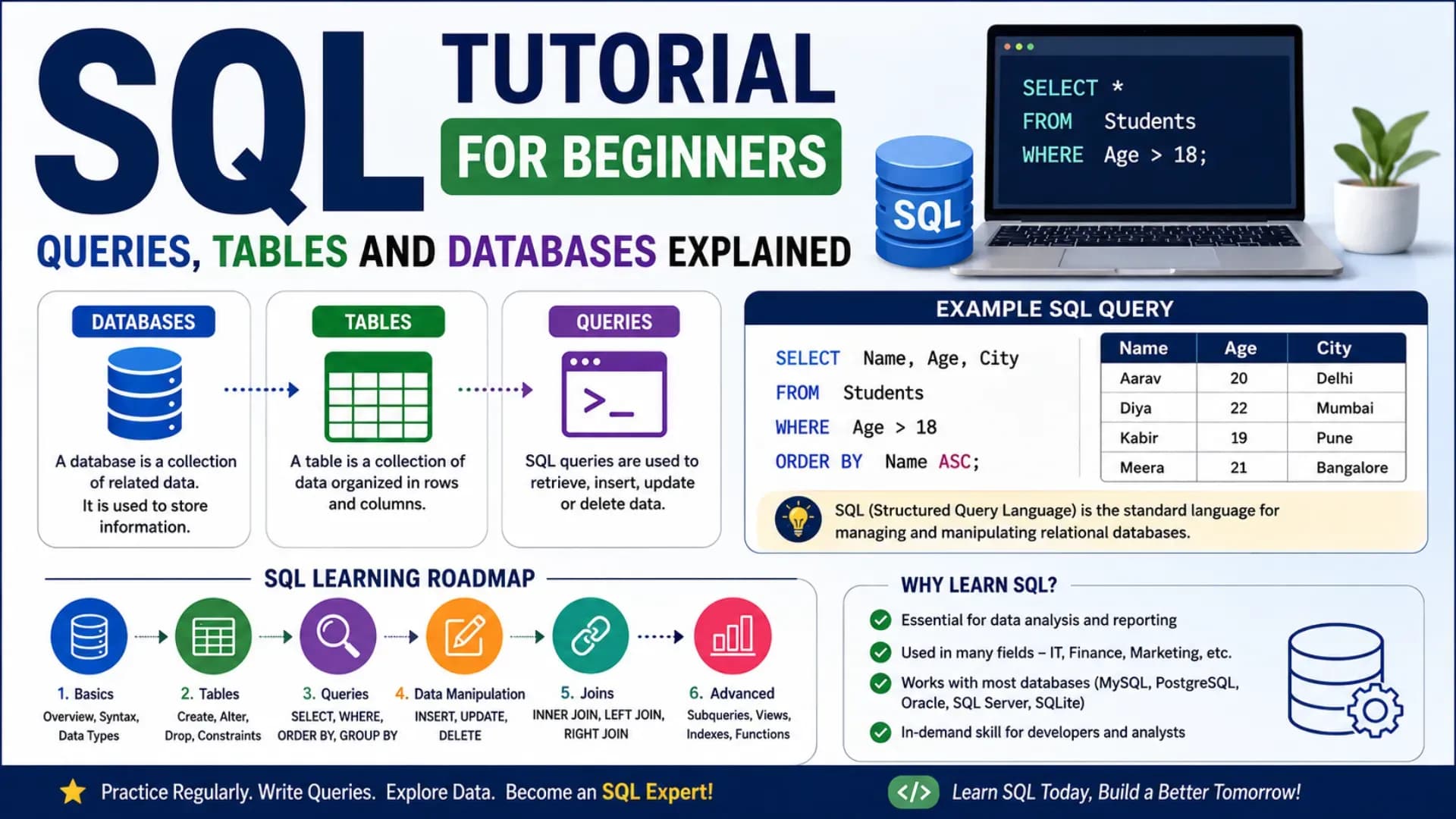
SQL — Structured Query Language — is the universal language for working with relational databases. It runs every search form, every login system, every e-commerce cart, and every analytics dashboard that stores information in a structured way. Unlike most programming languages, SQL basics are approachable: the syntax reads like plain English, the feedback is immediate (you run a query, you get data back), and the core concepts — tables, rows, columns, queries — match how most people already think about organised information. This complete SQL tutorial for beginners takes you from zero — what a database is and why SQL exists — through the full range of foundational skills: creating tables, inserting data, writing SQL SELECT statements, filtering, sorting, aggregating, and joining tables. Every concept comes with working SQL queries that you can run immediately in any SQL environment. By the end, you will have a practical foundation in SQL that applies to MySQL, PostgreSQL, SQLite, and SQL Server alike — because the core language is the same. Let's start.
Related Article:
Top BTech Colleges in India 2026
Table of Contents
- What Is SQL and How Do Databases Work?
- SQL Databases and Tables — Core Structure
- Creating Tables and Inserting Data
- The SQL SELECT Statement — Reading Data
- Filtering and Sorting — WHERE, ORDER BY, LIMIT
- Aggregate Functions — COUNT, SUM, AVG, MAX, MIN
- Updating and Deleting Data
- SQL Joins — Combining Tables
- Subqueries and Nested SQL
- Next Steps in Your SQL Journey
What Is SQL and How Do Databases Work?
A database is an organised collection of structured data — stored so that it can be efficiently retrieved, updated, and managed. A relational database organises data into tables (like spreadsheets) where rows represent individual records and columns represent attributes of those records. SQL is the language used to interact with relational databases — creating structure, putting data in, and getting it back out.
The most widely used relational database systems — MySQL, PostgreSQL, SQLite, Microsoft SQL Server, and Oracle — all use SQL with minor syntax variations. Learning SQL once means you can work across all of them. This beginner SQL guide uses standard SQL syntax that works across all major systems.
SQL has four main types of operations — often called CRUD:
- Create — build tables and insert data (
CREATE TABLE,INSERT INTO) - Read — retrieve data (
SELECT) - Update — modify existing data (
UPDATE) - Delete — remove data (
DELETE)
Where to Practice: To run SQL queries immediately, use DB Fiddle (dbfiddle.uk — free, browser-based), SQLiteOnline (sqliteonline.com), or install SQLite locally (free, no server needed). All examples in this database tutorial run in SQLite/MySQL/PostgreSQL without modification.
SQL Databases and Tables — Core Structure
Every SQL system organises data in the same conceptual hierarchy: a database contains one or more tables; each table has columns (fields) that define what kind of data is stored, and rows (records) that contain the actual data. Think of a table exactly like a spreadsheet: each column has a name and a data type; each row is one complete record.
-- A table called "students" might look like this:
--
-- id | name          | age | grade | city
-- ---|---------------|-----|-------|----------
--  1 | Priya Sharma  |  17 |    12 | Mumbai
--  2 | Arjun Mehta   |  18 |    12 | Delhi
--  3 | Riya Nair     |  16 |    11 | Kochi
--  4 | Dev Kapoor    |  17 |    11 | Pune
--  5 | Anika Patel   |  18 |    12 | Ahmedabad
--
-- Each column has a defined data type:
-- id    → INTEGER (whole number, unique identifier)
-- name  → VARCHAR (variable-length text)
-- age   → INTEGER
-- grade → INTEGER
-- city  → VARCHAR
Common SQL Data Types
INTEGER/INT— whole numbers (1, 42, -7)DECIMAL(p,s)/FLOAT— decimal numbers (3.14, 99.99)VARCHAR(n)— variable-length text up to n characters ('Hello', 'Mumbai')TEXT— unlimited-length textDATE— calendar date (YYYY-MM-DD)BOOLEAN— true or false (some databases use 0 and 1)NULL— represents absence of a value (not zero, not empty string — genuinely absent)
Creating Tables and Inserting Data
The CREATE TABLE statement defines the structure of a table — its columns and their data types. The INSERT INTO statement adds rows of data. These are the first SQL statements you will use when building any database from scratch.
-- Create the students table
CREATE TABLE students (
    id      INTEGER      PRIMARY KEY AUTOINCREMENT,
    name    VARCHAR(100) NOT NULL,
    age     INTEGER      NOT NULL,
    grade   INTEGER,
    city    VARCHAR(50),
    score   DECIMAL(5,2)
);

-- PRIMARY KEY: uniquely identifies each row — no two rows can share the same id
-- AUTOINCREMENT: id is assigned automatically (1, 2, 3...) on each insert
-- NOT NULL: this column cannot be left empty
-- Insert a single row
INSERT INTO students (name, age, grade, city, score)
VALUES ('Priya Sharma', 17, 12, 'Mumbai', 94.50);
-- Insert multiple rows in one statement
INSERT INTO students (name, age, grade, city, score)
VALUES
('Arjun Mehta', 18, 12, 'Delhi', 88.00),
('Riya Nair', 16, 11, 'Kochi', 91.25),
('Dev Kapoor', 17, 11, 'Pune', 79.00),
('Anika Patel', 18, 12, 'Ahmedabad', 96.75);
-- The id column fills automatically: 1, 2, 3, 4, 5
-- Note: column order in VALUES must match column order in the INSERT listThe SQL SELECT Statement — Reading Data
The SQL SELECT statement is the most used SQL command — it retrieves data from one or more tables. Every data query you write will start with SELECT. The basic structure is: SELECT which columns FROM which table.
-- Select ALL columns from students (the * means "everything")
SELECT * FROM students;

-- Select specific columns only
SELECT name, city, score FROM students;

-- Use column aliases to rename output columns
SELECT
    name        AS student_name,
    score       AS exam_score,
    city        AS home_city
FROM students;

-- Select with a calculated column
SELECT
    name,
    score,
    score * 1.1 AS boosted_score    -- 10% score bonus, computed on the fly
FROM students;

-- SELECT DISTINCT: return only unique values (removes duplicates)
SELECT DISTINCT city FROM students;
-- Returns: Mumbai, Delhi, Kochi, Pune, Ahmedabad  (each once, even if repeated)
SQL is case-insensitive for keywords: SELECT, select, and Select all work. By convention, SQL keywords are written in UPPERCASE to distinguish them from column and table names. Follow this convention — it makes SQL far more readable.
Also Read:
Top MTech Colleges in India 2026
Filtering and Sorting — WHERE, ORDER BY, LIMIT
Selecting all data is rarely useful in practice — you usually want specific records. WHERE filters rows based on conditions; ORDER BY sorts the result; LIMIT restricts how many rows are returned.
-- WHERE: filter rows by condition
SELECT * FROM students
WHERE grade = 12;

-- WHERE with comparison operators: =  !=  >  <  >=  <=
SELECT name, score FROM students
WHERE score >= 90;

-- Combine conditions with AND / OR
SELECT name, age, city FROM students
WHERE grade = 12 AND score > 85;

SELECT name, city FROM students
WHERE city = 'Mumbai' OR city = 'Delhi';

-- IN: match any value in a list (cleaner alternative to multiple OR)
SELECT name, city FROM students
WHERE city IN ('Mumbai', 'Delhi', 'Pune');

-- NOT IN: exclude values
SELECT name, city FROM students
WHERE city NOT IN ('Mumbai', 'Delhi');

-- BETWEEN: range filter (inclusive on both ends)
SELECT name, score FROM students
WHERE score BETWEEN 85 AND 95;

-- LIKE: pattern matching (% = any characters, _ = single character)
SELECT name FROM students
WHERE name LIKE 'A%';          -- names starting with A

SELECT name FROM students
WHERE name LIKE '%Sharma';     -- names ending with Sharma

-- IS NULL / IS NOT NULL
SELECT name FROM students
WHERE score IS NULL;            -- find students with no score recorded
-- ORDER BY: sort results
SELECT name, score FROM students
ORDER BY score DESC; -- highest score first (DESC = descending)
SELECT name, grade, score FROM students
ORDER BY grade ASC, score DESC; -- sort by grade ascending, then score descending
-- LIMIT: return only the first N rows
SELECT name, score FROM students
ORDER BY score DESC
LIMIT 3; -- top 3 students by scoreAggregate Functions — COUNT, SUM, AVG, MAX, MIN
Aggregate functions perform calculations across multiple rows and return a single result. They are the foundation of analytical SQL queries — reporting totals, averages, counts, and ranges. GROUP BY runs aggregate functions on subgroups of data; HAVING filters those groups.
-- COUNT: how many rows match
SELECT COUNT(*) AS total_students FROM students;
-- Returns: 5

SELECT COUNT(*) AS grade12_count
FROM students
WHERE grade = 12;
-- Returns: 3

-- SUM, AVG, MAX, MIN
SELECT
    SUM(score)  AS total_score,
    AVG(score)  AS average_score,
    MAX(score)  AS highest_score,
    MIN(score)  AS lowest_score
FROM students;

-- GROUP BY: aggregate per group
SELECT
    grade,
    COUNT(*)    AS student_count,
    AVG(score)  AS avg_score,
    MAX(score)  AS top_score
FROM students
GROUP BY grade;

-- Result:
-- grade | student_count | avg_score | top_score
-- ------|---------------|-----------|----------
--    11 |             2 |     85.13 |     91.25
--    12 |             3 |     93.08 |     96.75

-- HAVING: filter groups (WHERE filters rows; HAVING filters groups)
SELECT
    city,
    COUNT(*) AS student_count,
    AVG(score) AS avg_score
FROM students
GROUP BY city
HAVING AVG(score) > 85;       -- only cities where average score > 85
Updating and Deleting Data
UPDATE modifies existing rows; DELETE removes them. Both almost always use a WHERE clause — without it, every row in the table is affected, which is rarely what you want.
-- UPDATE: modify one or more columns in matching rows
UPDATE students
SET score = 95.00
WHERE name = 'Arjun Mehta';

-- UPDATE multiple columns at once
UPDATE students
SET score = 90.00, city = 'Bangalore'
WHERE id = 3;

-- UPDATE based on a calculated value
UPDATE students
SET score = score + 5            -- add 5 bonus marks to every Grade 11 student
WHERE grade = 11;

-- DELETE: remove matching rows
DELETE FROM students
WHERE id = 4;

-- ⚠️  DANGER: DELETE without WHERE removes ALL rows
-- DELETE FROM students;   ← never run without a WHERE clause unless intentional

-- Verify before deleting: run SELECT first to see what would be deleted
SELECT * FROM students WHERE score < 80;   -- confirm who would be deleted
DELETE FROM students WHERE score < 80;     -- then delete with confidence
CHECK OUT:
Top Colleges in Ranchi 2026
SQL Joins — Combining Tables
SQL joins are among the most powerful features of relational databases — they combine rows from two or more tables based on a related column. Instead of storing all information in one giant table (which creates duplication and inconsistency), you store related data in separate tables and use joins to bring it together when needed.
-- Setup: two related tables
CREATE TABLE courses (
    course_id   INTEGER PRIMARY KEY,
    course_name VARCHAR(100),
    teacher     VARCHAR(100)
);

CREATE TABLE enrollments (
    enrollment_id INTEGER PRIMARY KEY,
    student_id    INTEGER,           -- links to students.id
    course_id     INTEGER,           -- links to courses.course_id
    grade_obtained VARCHAR(5)
);

INSERT INTO courses VALUES
    (1, 'Mathematics',  'Mr. Rao'),
    (2, 'Physics',       'Ms. Iyer'),
    (3, 'Computer Sci.', 'Mr. Gupta');

INSERT INTO enrollments VALUES
    (1, 1, 1, 'A'),   -- Priya enrolled in Mathematics
    (2, 1, 3, 'A+'),  -- Priya enrolled in Computer Science
    (3, 2, 2, 'B+'),  -- Arjun enrolled in Physics
    (4, 3, 1, 'A-');  -- Riya enrolled in Mathematics
-- INNER JOIN: return rows where the join condition matches in BOTH tables
-- (rows with no match in either table are excluded)
SELECT
s.name AS student_name,
c.course_name,
e.grade_obtained
FROM enrollments e
INNER JOIN students s ON e.student_id = s.id
INNER JOIN courses c ON e.course_id = c.course_id;
-- Result:
-- student_name | course_name | grade_obtained
-- --------------|----------------|---------------
-- Priya Sharma | Mathematics | A
-- Priya Sharma | Computer Sci. | A+
-- Arjun Mehta | Physics | B+
-- Riya Nair | Mathematics | A--- LEFT JOIN: return ALL rows from the left table, plus matching rows from right
-- (unmatched left rows still appear; right-side columns are NULL)
SELECT
s.name AS student_name,
e.course_id,
e.grade_obtained
FROM students s
LEFT JOIN enrollments e ON s.id = e.student_id;
-- Students with no enrollments still appear (with NULL in enrollment columns)
-- Useful for finding students who haven't enrolled in any course:
SELECT s.name
FROM students s
LEFT JOIN enrollments e ON s.id = e.student_id
WHERE e.enrollment_id IS NULL; -- no matching enrollment = not enrolledJoin Types Summary: INNER JOIN — only matching rows from both tables. LEFT JOIN — all left rows + matching right rows (NULL where no match). RIGHT JOIN — all right rows + matching left rows. FULL OUTER JOIN — all rows from both tables (NULL where no match on either side). INNER JOIN and LEFT JOIN cover 90% of real-world use cases.
Subqueries and Nested SQL
A subquery is a SQL query nested inside another query — it runs first and its result is used by the outer query. Subqueries enable complex filtering, calculations, and comparisons that would otherwise require multiple steps.
-- Subquery in WHERE: find students scoring above the class average
SELECT name, score
FROM students
WHERE score > (
    SELECT AVG(score)
    FROM students
);
-- The inner query computes the average first (e.g., 89.90)
-- The outer query returns students with score > 89.90

-- Subquery with IN: find students enrolled in Physics
SELECT name
FROM students
WHERE id IN (
    SELECT student_id
    FROM enrollments
    WHERE course_id = (
        SELECT course_id
        FROM courses
        WHERE course_name = 'Physics'
    )
);

-- Subquery in FROM (derived table): give a name to the inner result
SELECT grade, avg_score
FROM (
    SELECT grade, AVG(score) AS avg_score
    FROM students
    GROUP BY grade
) AS grade_averages
WHERE avg_score > 88;            -- filter the derived table's results
Next Steps in Your SQL Journey
This SQL tutorial for beginners has given you the foundational skills to create tables, insert data, write SQL SELECT statements, filter, sort, aggregate, join, and use subqueries. The natural progression from here:
- Indexes: Speed up queries on large tables —
CREATE INDEXon frequently searched columns. Essential for performance in production databases - Constraints and Foreign Keys:
FOREIGN KEYenforces referential integrity between tables — ensures that astudent_idin enrollments always refers to an actual student in the students table - Transactions:
BEGIN TRANSACTION,COMMIT,ROLLBACK— group multiple SQL operations so they either all succeed or all fail together. Critical for financial and inventory systems - Window Functions:
ROW_NUMBER(),RANK(),LAG(),LEAD()— advanced analytics that operate across rows without collapsing them into a single result like GROUP BY does - Views:
CREATE VIEW— save a SELECT query as a named virtual table that you can query like a regular table - Pick a database system and build something real: PostgreSQL (open source, production-grade, excellent documentation), MySQL (most widely deployed), or SQLite (serverless, perfect for mobile and learning) — choose one and build an actual project. A school database, a personal expense tracker, a book catalogue — real constraints produce real learning
Recommended Practice: After reading each section, open DB Fiddle (dbfiddle.uk) and type the examples from memory — not copy-paste. Then modify them: change the WHERE condition, add a new column, combine two concepts. The best way to learn SQL is to break things intentionally and understand why the error occurred.
Explore More
Conclusion
You now have a complete foundation in SQL — from creating SQL databases and SQL tables to writing SQL queries that filter, sort, aggregate, and join data. The SQL basics covered here — SELECT, WHERE, JOIN, GROUP BY, subqueries — represent the vast majority of SQL used in real applications, data analysis, and backend development.
The transition from beginner to proficient SQL developer happens entirely through practice on real data. Find a dataset you care about — student records, cricket scores, product catalogues — load it into a database, and start writing queries to answer questions from it. Every complex query is just a combination of the building blocks in this beginner SQL guide. Open DB Fiddle, type your first CREATE TABLE, and write your first SELECT. That is where the understanding becomes yours.