
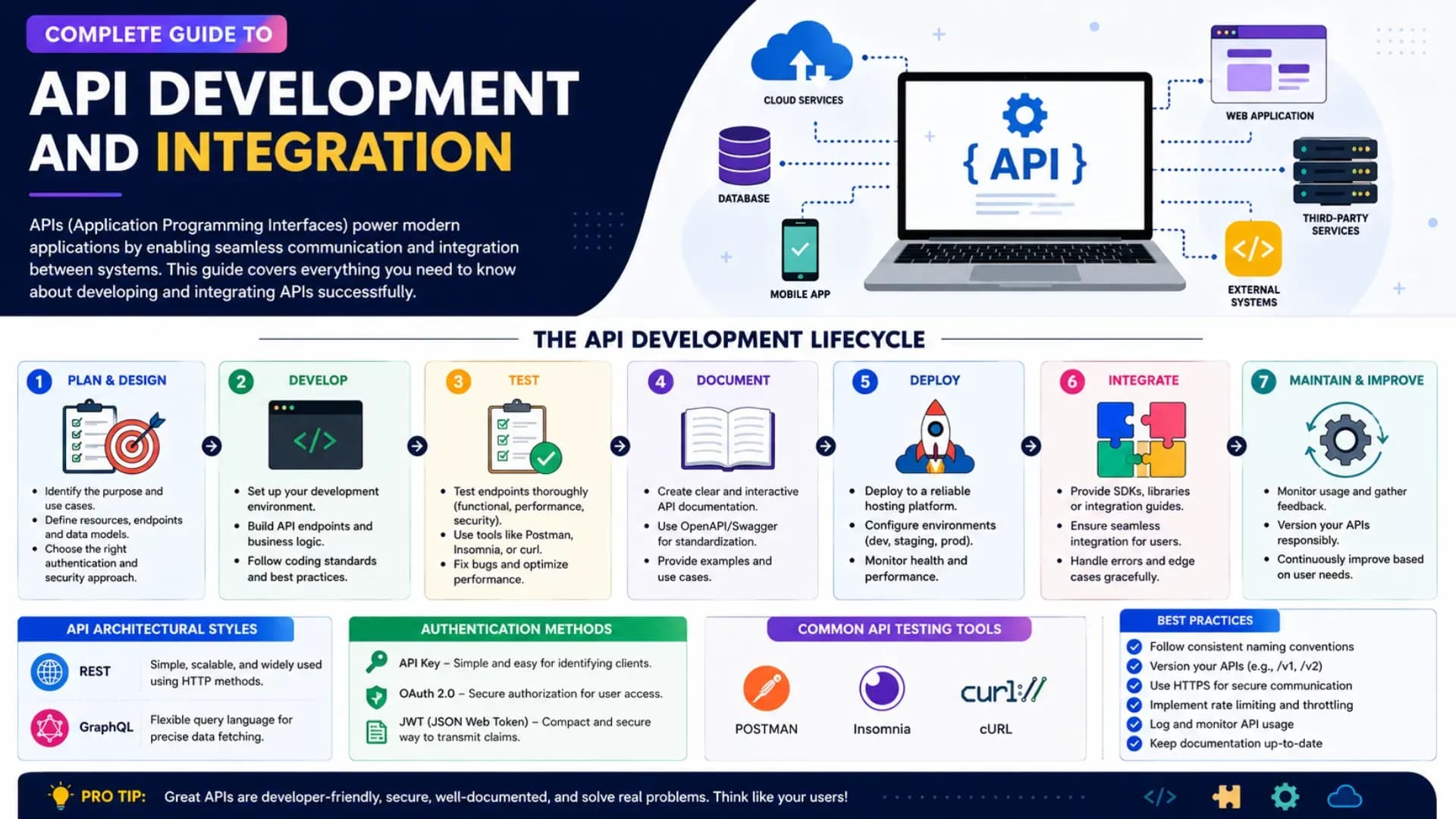
APIs — Application Programming Interfaces — are the connective tissue of modern software. Every time your phone checks the weather, every time your payment app confirms a transaction, every time a website loads personalised content — an API call is happening. In 2026, the ability to design, build, secure, and integrate APIs is one of the most universally required backend engineering skills, present in virtually every technology role from junior developer to senior architect. This API Development Tutorial is your complete guide to Learn API Development from scratch: covering what APIs are, building a complete REST API Tutorial 2026 with working Python code, implementing API Authentication correctly, using API Testing Tools, applying API Design Best Practices, and building a practical API Integration Tutorial with real third-party services. Whether you are a beginner or an engineer looking to solidify your understanding — this API Integration Guide and Backend API Guide gives you everything you need, with code you can run today.
Related Article: Top BTech Colleges in India 2026
Table of Contents
- API Fundamentals — What APIs Are and How They Work
- REST API Tutorial — Building a Complete REST API in Python
- API Authentication — API Keys, JWT, and OAuth 2.0
- API Design Best Practices — Versioning, Errors, and Pagination
- API Testing Tools — Postman, pytest, and Automated Testing
- API Integration Tutorial — Consuming Third-Party APIs
- API Development Roadmap — Career Path and Next Steps
API Fundamentals — What APIs Are and How They Work
An API is a contract between two software components: "if you send me a request in this format, I will send you a response in that format." The contract hides the implementation — you don't need to know how the weather service stores and calculates weather data; you just need to know what URL to call and what parameters to send.
# The API landscape in 2026 — types and when to use each:
#
# REST (Representational State Transfer):
#   The dominant API style for web services
#   Uses HTTP methods: GET, POST, PUT, PATCH, DELETE
#   Resources identified by URLs: /users/42, /products/123/reviews
#   Returns JSON (primarily) or XML
#   When to use: public APIs, mobile backends, microservice communication
#
# GraphQL:
#   Client specifies exactly what data it needs — no over-fetching or under-fetching
#   Single endpoint (/graphql) with query language
#   When to use: complex data graphs, mobile apps where bandwidth matters, rapid frontend iteration
#   Used by: GitHub, Shopify, Facebook, Twitter/X
#
# gRPC (Google Remote Procedure Call):
#   Binary protocol (Protocol Buffers) — 5-10x smaller and faster than REST+JSON
#   Strongly typed; generates client code automatically
#   When to use: internal microservice communication, high-throughput systems
#   Used by: Google internal services, Netflix, Cloudflare
#
# WebSockets:
#   Persistent bidirectional connection — real-time data without polling
#   When to use: chat, live dashboards, collaborative editing, trading platforms

# The anatomy of an HTTP request/response:
http_request = {
    "method":  "POST",
    "url":     "https://api.example.com/v1/orders",
    "headers": {
        "Content-Type":  "application/json",
        "Authorization": "Bearer eyJhbGciOiJIUzI1NiIsInR5cCI6IkpXVCJ9...",
        "Accept":         "application/json",
    },
    "body": {
        "product_id": 42,
        "quantity":   3,
        "address_id": "addr_abc123",
    }
}

http_response = {
    "status_code": 201,          # Created
    "headers": {
        "Content-Type":     "application/json",
        "X-Request-Id":     "req_7f3a2b9c",
        "X-RateLimit-Limit": "1000",
        "X-RateLimit-Remaining": "997",
    },
    "body": {
        "order_id": "ord_98xyz",
        "status":   "pending",
        "total":    2997.00,
        "created_at": "2026-06-01T14:32:00Z",
    }
}
REST API Tutorial — Building a Complete REST API in Python
The most effective way to Learn API Development is to build a complete working API. This REST API Tutorial 2026 builds a Books API with full CRUD operations using FastAPI — the fastest-growing Python web framework for Web API Development in 2026, chosen for its automatic OpenAPI documentation, type hints, and performance comparable to NodeJS.
# pip install fastapi uvicorn pydantic
# Run: uvicorn main:app --reload
# Auto-docs at: http://localhost:8000/docs

from fastapi import FastAPI, HTTPException, status, Query
from pydantic import BaseModel, Field
from typing import Optional
from datetime import datetime
import uuid

app = FastAPI(
    title="Books API",
    version="1.0.0",
    description="A complete REST API example for API Development Tutorial",
)

# Data models — Pydantic validates request/response data automatically:
class BookCreate(BaseModel):
    title:   str = Field(..., min_length=1, max_length=200)
    author:  str = Field(..., min_length=1, max_length=100)
    isbn:    str = Field(..., pattern=r"^\d{13}$")
    price:   float = Field(..., gt=0, le=10000)
    genre:   str
    in_stock: bool = True

class Book(BookCreate):
    id:         str
    created_at: datetime
    updated_at: datetime

class BookUpdate(BaseModel):
    title:    Optional[str]  = None
    price:    Optional[float] = None
    in_stock: Optional[bool]  = None

# In-memory store (use a real database — PostgreSQL, MongoDB — in production):
books_db: dict[str, Book] = {}

# CREATE — POST /v1/books
@app.post("/v1/books", response_model=Book, status_code=status.HTTP_201_CREATED)
async def create_book(book: BookCreate):
    book_id = str(uuid.uuid4())
    now = datetime.utcnow()
    new_book = Book(id=book_id, created_at=now, updated_at=now, **book.dict())
    books_db[book_id] = new_book
    return new_book

# READ ONE — GET /v1/books/{book_id}
@app.get("/v1/books/{book_id}", response_model=Book)
async def get_book(book_id: str):
    if book_id not in books_db:
        raise HTTPException(status_code=404, detail=f"Book {book_id} not found")
    return books_db[book_id]

# READ MANY — GET /v1/books?genre=fiction&page=1&size=20
@app.get("/v1/books", response_model=dict)
async def list_books(
    genre: Optional[str] = None,
    in_stock: Optional[bool] = None,
    page: int = Query(1, ge=1),
    size: int = Query(20, ge=1, le=100),
):
    results = list(books_db.values())
    if genre:     results = [b for b in results if b.genre == genre]
    if in_stock is not None: results = [b for b in results if b.in_stock == in_stock]
    total = len(results)
    start = (page - 1) * size
    return {
        "data": results[start:start + size],
        "pagination": {"page": page, "size": size, "total": total,
                        "pages": (total + size - 1) // size}
    }

# UPDATE — PATCH /v1/books/{book_id} (partial update)
@app.patch("/v1/books/{book_id}", response_model=Book)
async def update_book(book_id: str, update: BookUpdate):
    if book_id not in books_db:
        raise HTTPException(status_code=404, detail=f"Book {book_id} not found")
    book = books_db[book_id]
    update_data = update.dict(exclude_unset=True)
    updated = book.copy(update={**update_data, "updated_at": datetime.utcnow()})
    books_db[book_id] = updated
    return updated

# DELETE — DELETE /v1/books/{book_id}
@app.delete("/v1/books/{book_id}", status_code=status.HTTP_204_NO_CONTENT)
async def delete_book(book_id: str):
    if book_id not in books_db:
        raise HTTPException(status_code=404, detail=f"Book {book_id} not found")
    del books_db[book_id]
API Authentication — API Keys, JWT, and OAuth 2.0
API Authentication is the most security-critical part of API Development Tutorial content — and the part most often implemented incorrectly. Understanding when to use API keys versus JWT versus OAuth 2.0 is the first decision every API designer makes.
# API Authentication methods — when to use which:
#
# API KEYS: simple string tokens tied to an application (not a user)
#   Use for: server-to-server calls; developer access; simple public APIs
#   Header: Authorization: ApiKey sk-prod-abc123def456
#   NEVER put API keys in URLs (they end up in server logs)
#   NEVER commit API keys to Git (use environment variables)
#
# JWT (JSON Web Token): signed tokens that contain user claims
#   Use for: user authentication in REST APIs; stateless sessions
#   Structure: header.payload.signature (all base64-encoded)
#   Expiry: always set — typically 15 min access token + 7 day refresh token
#   Verify signature on every request; never trust unverified claims
#
# OAUTH 2.0: delegated authorisation — "login with Google/GitHub"
#   Use for: third-party integrations; social login; user grants app access to their data
#   Flows: Authorization Code (web apps), PKCE (mobile/SPA), Client Credentials (server)
#   You almost never build OAuth 2.0 from scratch — use an auth provider

# pip install python-jose passlib fastapi
from jose import jwt, JWTError
from passlib.context import CryptContext
from datetime import datetime, timedelta
from fastapi import Depends, HTTPException, status
from fastapi.security import OAuth2PasswordBearer
import os

SECRET_KEY     = os.environ["JWT_SECRET_KEY"]  # never hardcode
ALGORITHM      = "HS256"
ACCESS_EXPIRY  = timedelta(minutes=15)
REFRESH_EXPIRY = timedelta(days=7)

pwd_context    = CryptContext(schemes=["bcrypt"], deprecated="auto")
oauth2_scheme  = OAuth2PasswordBearer(tokenUrl="/v1/auth/token")

def hash_password(plain: str) -> str:
    return pwd_context.hash(plain)

def verify_password(plain: str, hashed: str) -> bool:
    return pwd_context.verify(plain, hashed)

def create_access_token(user_id: str, scopes: list[str] = []) -> str:
    payload = {
        "sub":    user_id,
        "scopes": scopes,
        "iat":    datetime.utcnow(),
        "exp":    datetime.utcnow() + ACCESS_EXPIRY,
        "type":   "access",
    }
    return jwt.encode(payload, SECRET_KEY, algorithm=ALGORITHM)

async def get_current_user(token: str = Depends(oauth2_scheme)) -> str:
    """FastAPI dependency — inject into any route to require authentication."""
    try:
        payload = jwt.decode(token, SECRET_KEY, algorithms=[ALGORITHM])
        user_id: str = payload.get("sub")
        if not user_id or payload.get("type") != "access":
            raise HTTPException(status_code=401, detail="Invalid token")
        return user_id
    except JWTError:
        raise HTTPException(status_code=401, detail="Invalid or expired token")

# Usage in a protected route:
# @app.get("/v1/me")
# async def get_me(user_id: str = Depends(get_current_user)):
#     return {"user_id": user_id}
API Design Best Practices — Versioning, Error Handling, and Pagination
API Design Best Practices separate APIs that developers enjoy using from APIs that cause support tickets and workarounds. Good API design is a product discipline as much as a technical one — the consumer of your API is a developer, and developer experience is the metric that matters.
# API Design Best Practices — the patterns that matter most:
#
# 1. VERSIONING — plan for breaking changes from day one:
#    URL versioning (most common):    /v1/users, /v2/users
#    Header versioning:               Accept: application/vnd.api+json;version=2
#    Rule: v1 is a commitment; never break it. Add v2 alongside it.
#    Deprecation: give consumers 6-12 months warning with Sunset header:
#      Sunset: Sat, 01 Jan 2027 00:00:00 GMT
#      Deprecation: Mon, 01 Jul 2026 00:00:00 GMT
#
# 2. HTTP STATUS CODES — use them correctly:
http_status_guide = {
    200: "OK              — GET, PATCH, PUT succeeded",
    201: "Created         — POST created a resource; include Location header",
    204: "No Content      — DELETE succeeded; no response body",
    400: "Bad Request     — Client sent invalid data; include field-level detail",
    401: "Unauthorized    — Missing or invalid authentication",
    403: "Forbidden       — Authenticated but not permitted for this resource",
    404: "Not Found       — Resource doesn't exist",
    409: "Conflict        — Duplicate resource; optimistic locking conflict",
    422: "Unprocessable   — Validation failed (FastAPI's default for Pydantic errors)",
    429: "Too Many Req    — Rate limit exceeded; include Retry-After header",
    500: "Server Error    — Internal failure; never expose stack traces to clients",
}

# 3. ERROR RESPONSE STRUCTURE — consistent error format across the entire API:
error_response_schema = {
    "error": {
        "code":    "VALIDATION_ERROR",          # machine-readable code
        "message": "Request validation failed",  # human-readable summary
        "details": [                           # field-level detail
            {"field": "isbn",  "issue": "Must be exactly 13 digits"},
            {"field": "price", "issue": "Must be greater than 0"},
        ],
        "request_id": "req_7f3a2b9c",          # for support tracing
        "docs_url": "https://docs.api.com/errors/VALIDATION_ERROR",
    }
}

# 4. PAGINATION — cursor-based is better than offset for large datasets:
#
# Offset pagination: ?page=3&size=20
#   Problem: if items are added/deleted, page 3 shows different items each call
#   OK for: small datasets, admin panels, sorting by stable field
#
# Cursor pagination: ?cursor=eyJpZCI6MTAwfQ&size=20
#   Stable: cursor is an encoded pointer (e.g. last seen ID)
#   Scales: O(1) DB query regardless of position; no COUNT(*) needed
#   Use for: feeds, activity streams, large datasets
pagination_response = {
    "data": ["...items..."],
    "pagination": {
        "size": 20,
        "next_cursor": "eyJpZCI6MTIwfQ",  # base64({"id":120})
        "has_more": True,
        "total": None,  # not computed for cursor pagination (expensive)
    }
}
Also Read: Top MTech Colleges in India 2026
API Testing Tools — Postman, pytest, and Automated Testing
Untested APIs are bugs waiting to be discovered in production. API Testing Tools range from interactive GUI clients for manual exploration to automated test suites that run on every code change.
# API Testing Tools in 2026 — the complete toolkit:
#
# MANUAL / EXPLORATORY TESTING:
#   Postman       — most widely used; GUI; collections; environments; mock servers
#   Insomnia      — open-source alternative; clean UI; GraphQL support
#   Bruno         — git-native; stores collections as files; privacy-focused
#   curl          — command-line; scriptable; available everywhere
#   HTTPie        — friendlier curl; readable syntax
#   FastAPI /docs — auto-generated Swagger UI; zero setup for FastAPI projects
#
# AUTOMATED TESTING (write these — they run on every commit):
#   pytest + httpx — Python async test client; pair with FastAPI perfectly
#   Jest + supertest — Node.js API testing
#   RSpec          — Ruby on Rails API testing
#

# LOAD / PERFORMANCE TESTING:
#   k6             — JavaScript-based; CI/CD friendly; beautiful output
#   Locust         — Python-based; define user behaviour as code
#   Apache JMeter  — Enterprise; GUI; widely used in Indian enterprise contexts

# Writing automated API tests with pytest + httpx (FastAPI's recommended approach):
# pip install pytest httpx pytest-asyncio

from fastapi.testclient import TestClient
import pytest

# from main import app  # import your FastAPI app
# client = TestClient(app)

class TestBooksAPI:
    def test_create_book_success(self, client):
        payload = {
            "title": "Clean Code", "author": "Robert C. Martin",
            "isbn": "9780132350884", "price": 599.0, "genre": "programming"
        }
        response = client.post("/v1/books", json=payload)
        assert response.status_code == 201
        data = response.json()
        assert data["title"] == "Clean Code"
        assert "id" in data          # server generated the ID
        assert "created_at" in data  # server set the timestamp

    def test_create_book_invalid_isbn(self, client):
        payload = {"title": "Test", "author": "A", "isbn": "123",
                   "price": 10, "genre": "test"}
        response = client.post("/v1/books", json=payload)
        assert response.status_code == 422  # Pydantic validation error

    def test_get_nonexistent_book(self, client):
        response = client.get("/v1/books/nonexistent-id")
        assert response.status_code == 404
        assert "not found" in response.json()["detail"].lower()

    def test_list_books_pagination(self, client):
        response = client.get("/v1/books?page=1&size=5")
        assert response.status_code == 200
        data = response.json()
        assert "data" in data
        assert "pagination" in data
        assert len(data["data"]) <= 5  # never more than requested size

    def test_delete_book(self, client):
        # Create → then delete → then verify gone
        create_resp = client.post("/v1/books", json={
            "title": "To Delete", "author": "X", "isbn": "9780000000001",
            "price": 1.0, "genre": "test"
        })
        book_id = create_resp.json()["id"]
        del_resp = client.delete(f"/v1/books/{book_id}")
        assert del_resp.status_code == 204
        get_resp = client.get(f"/v1/books/{book_id}")
        assert get_resp.status_code == 404  # confirmed deleted
API Integration Tutorial — Consuming Third-Party APIs
API Integration Tutorial covers the consumer side — calling APIs that others have built. The most important skill is not just making a successful API call, but handling the full range of outcomes: timeouts, rate limits, authentication failures, and unexpected response formats.
# pip install httpx tenacity
import httpx
import os
from tenacity import retry, stop_after_attempt, wait_exponential, retry_if_exception_type

class APIClient:
    """Production-grade third-party API client — the pattern you should always use."""

    def __init__(self, base_url: str, api_key: str, timeout: float = 10.0):
        self.base_url = base_url.rstrip("/")
        self.client = httpx.AsyncClient(
            headers={
                "Authorization": f"Bearer {api_key}",
                "Content-Type":  "application/json",
                "Accept":         "application/json",
                "User-Agent":     "MyApp/2.0 ([email protected])",
            },
            timeout=httpx.Timeout(connect=5.0, read=timeout, write=10.0),
        )

    @retry(
        stop=stop_after_attempt(3),
        wait=wait_exponential(multiplier=1, min=1, max=10),
        retry=retry_if_exception_type((httpx.TimeoutException, httpx.ConnectError)),
    )
    async def get(self, path: str, **params) -> dict:
        response = await self.client.get(f"{self.base_url}{path}", params=params)
        return self._handle_response(response)

    async def post(self, path: str, body: dict) -> dict:
        response = await self.client.post(f"{self.base_url}{path}", json=body)
        return self._handle_response(response)

    def _handle_response(self, response: httpx.Response) -> dict:
        if response.status_code == 429:
            retry_after = response.headers.get("Retry-After", "60")
            raise RateLimitError(f"Rate limited. Retry after {retry_after}s")
        if response.status_code == 401:
            raise AuthenticationError("API key invalid or expired")
        if response.status_code >= 500:
            raise ServerError(f"Upstream server error: {response.status_code}")
        response.raise_for_status()
        return response.json()

    async def __aenter__(self): return self
    async def __aexit__(self, *args): await self.client.aclose()

# Usage with Razorpay API (real Indian payment gateway — adjust base_url for actual use):
async def create_payment_order(amount_paise: int, currency: str = "INR") -> dict:
    async with APIClient(
        base_url="https://api.razorpay.com/v1",
        api_key=os.environ["RAZORPAY_KEY_ID"],
    ) as client:
        return await client.post("/orders", body={
            "amount":   amount_paise,
            "currency": currency,
            "receipt":  "order_rcptid_11",
        })
# Webhook handling — receiving callbacks from third-party APIs:
#
# Webhooks: the API calls YOU (not you calling it)
# Example: payment gateway calls your /webhooks/payment when payment completes
#
# ALWAYS verify webhook signatures — don't trust unverified callbacks:
import hmac, hashlib
def verify_razorpay_webhook(
payload_bytes: bytes,
received_signature: str,
webhook_secret: str
) -> bool:
"""Verify Razorpay webhook using HMAC-SHA256 signature."""
expected = hmac.new(
webhook_secret.encode(),
payload_bytes,
hashlib.sha256
).hexdigest()
# Use secrets.compare_digest — prevents timing attacks
import secrets
return secrets.compare_digest(expected, received_signature)
# FastAPI webhook endpoint:
# @app.post("/webhooks/razorpay")
# async def razorpay_webhook(request: Request):
# body = await request.body()
# sig = request.headers.get("X-Razorpay-Signature", "")
# if not verify_razorpay_webhook(body, sig, os.environ["RAZORPAY_WEBHOOK_SECRET"]):
# raise HTTPException(status_code=400, detail="Invalid webhook signature")
# event = await request.json()
# # Process event["event"] and event["payload"]
# return {"status": "received"}API Development Roadmap — Career Path and India Salary Guide
# API Development Roadmap — 12-month structured learning path:
#
# MONTHS 1–2 — HTTP and REST Fundamentals:
#   ✓ Understand HTTP completely: methods, headers, status codes, caching
#   ✓ Build the Books API from this article; extend it with a real database (SQLite → PostgreSQL)
#   ✓ Learn curl and Postman — manual API exploration is essential
#   ✓ Deploy your API: Heroku (free tier) or Railway or Render
#

# MONTHS 3–4 — Authentication, Security, and Testing:
#   → Implement JWT authentication end-to-end with refresh tokens
#   → Write automated tests: 100% coverage on your Books API
#   → Learn OWASP API Security Top 10 — these are the attacks you must defend against
#   → Rate limiting with Redis (redis-py + slowapi)
#

# MONTHS 5–6 — Advanced API Development:
#   → OpenAPI spec / Swagger — document your API before building it
#   → GraphQL basics: build one API in both REST and GraphQL; compare
#   → WebSockets: add real-time notifications to the Books API
#   → Database connection pooling, migrations (Alembic for SQLAlchemy)
#

# MONTHS 7–9 — Production API Systems:
#   → API Gateway: Kong, AWS API Gateway, or Nginx — rate limiting, auth at gateway
#   → Monitoring: Prometheus + Grafana; add /metrics endpoint to your API
#   → Caching: Redis cache layer for expensive API responses
#   → gRPC: build one internal microservice-to-microservice API with gRPC
#

# MONTHS 10–12 — Portfolio and Job Search:
#   → Build: a complete API product — payment integration, webhooks, docs, versioning
#   → Publish: OpenAPI spec on your GitHub; add Swagger UI documentation
#   → Target roles: Backend Engineer, API Engineer, Platform Engineer
#   → India companies: Razorpay, Juspay, Setu, PayU, PhonePe (fintech APIs)
#                      Postman, Kong, Hasura (API tooling companies in India)
#                      Flipkart, Meesho, Zepto, Zomato (large backend teams)

# India salary ranges for API / backend roles (2026):
india_salaries = {
    "Junior Backend / API Engineer (0-2 yrs)": "₹6–14 LPA",
    "Backend Engineer (2-4 yrs)":              "₹14–30 LPA",
    "Senior Backend / API Engineer (4-7 yrs)": "₹28–55 LPA",
    "Staff / Principal Engineer (7+ yrs)":     "₹50–100 LPA",
    "Fintech API roles premium":               "15–25% above typical backend market",
}
for role, salary in india_salaries.items():
    print(f"  {role:45} → {salary}")

# Essential books and resources:
resources = {
    "API Design Patterns (Loskot)":   "Best single book on API design — Manning",
    "REST API Design Rulebook (Masse)":"O'Reilly — foundational REST patterns",
    "OWASP API Security Top 10":       "owasp.org — free; the attack list every API dev must know",
    "FastAPI docs":                    "fastapi.tiangolo.com — best framework documentation in Python",
    "Postman Learning Center":         "learning.postman.com — free; covers all API testing patterns",
}
The single most important habit in API development: Write your API documentation before you write your code. A developer who cannot clearly describe what an endpoint does, what it accepts, and what it returns — in plain language and in an OpenAPI spec — does not yet have a clear enough mental model to implement it correctly. Documentation-first API development produces better designs, fewer breaking changes, and APIs that other developers actually want to use. Start with the spec; let the code follow.
CHECK OUT: Top Colleges in Ranchi 2026
Explore More
Conclusion
This API Development Tutorial has taken you from API fundamentals through a complete production-grade implementation: the REST API Tutorial 2026 with full CRUD in FastAPI, API Authentication with JWT and OAuth 2.0, API Design Best Practices covering versioning, error handling, and pagination, the complete API Testing Tools suite with automated pytest coverage, a production-grade API Integration Tutorial with retry logic and webhook verification, and the full API Development Roadmap with India salary data and resource recommendations.
Learn API Development not by reading more articles but by building and shipping APIs that real users call. The API Integration Guide and code in this article are starting templates — the genuine Web API Development learning happens when you extend them, break them, fix them, and eventually deploy them to production where real traffic tests your error handling and your rate limiting and your authentication. This Backend API Guide is complete — and every API Integration Tutorial pattern here is directly applicable to the next API you build. Start with the Books API, add authentication, write the tests, deploy it, and then integrate one real third-party API. That sequence is your API Development Roadmap for the first month. The rest follows. Every API for Beginners journey starts with one working endpoint — and this API for Beginners guide has given you several. The API Integration Guide patterns here — retry logic, webhook verification, error handling — are not advanced topics reserved for senior engineers: they are the baseline of professional API Integration Guide work, applicable from your first production integration. Every improvement in your Web API Development craft compounds: a well-designed Web API Development project in your portfolio communicates more to a hiring manager than a certificate. This Backend API Guide is your reference — return to each section of this Backend API Guide when the relevant challenge is live in your work. Build the API. Test it. Ship it. This API for Beginners guide is a complete start — every API for Beginners resource tells you what to build; this one gives you the production-grade patterns to build it correctly from the first line of code.